GPX Quiz
GPX Quiz
Designed the administrator panel for a quiz app with a seamless flow for handling subscriptions, user details, feedback and more for a French client.
Team
1 Stakeholder
2 Developers
1 UX Designer
1 Project Manager
1 Stakeholder
2 Developers
1 UX Designer
1 Project Manager
UX Methods
Ideation
Wireframing
Information Architecture
Visual Design
Interaction Design
Ideation
Wireframing
Information Architecture
Visual Design
Interaction Design
My Role
UX Designer
UX Designer
About GPX Quiz
GPX Quiz is an online education app tailored for individuals preparing for the police department examination in France. It aligns with the latest syllabus and question patterns. While the user flow was available on Google Play Store, the growing user base required an administrator panel for enhanced control and management. Additionally, the owner introduced paid models, requiring users to subscribe and pay a fee for access. This led to the need for a separate administrator panel to manage subscriptions and related functionalities effectively.
Discovery Phase
Understanding the Client's Vision
The client and our team aligned on key requirements for the GPX admin panel, including a homepage, feedback management, subscription management, and a system to add questions categorized by specific models.
During multiple client interviews, we clarified his vision and discovered that scalability wasn’t a concern. His primary goal was to efficiently manage the GPX Quiz user panel, which featured multiple question models across various categories. He also sought suggestions for integrating user feedback, especially from paid users, to address updates like syllabus revisions or question additions.
Observational Research
Beyond discussions, I observed how the client interacted with the existing system to identify workflow inefficiencies. For instance, redundant navigation steps and unclear categorization processes in the user panel caused unnecessary delays. These insights were pivotal in imagining the admin panel's flow to ensure a more streamlined experience.
Team Brief
The developers and I collaborated on creating an efficient, minimalist design. Given the density and detail of the data to be added into the admin panel, our goal was to streamline its functionality. We aimed to keep both the process and the design straightforward to ensure tasks could be completed with less hassle and more efficiency.

As the head of design for this project, I dove in by thoroughly analyzing the existing user flow to identify areas of improvement and key strengths. This analysis helped me pinpoint which elements from the existing design should be excluded from the admin panel, ensuring alignment with the client’s preference for maintaining the same layout as the user panel.
Previously, questions were integrated through third-party APIs, which limited his control over the content and restricted modifications. This approach also led to increasing costs. The admin panel aimed to resolve these issues, offering a centralized, cost-effective solution with complete content control.
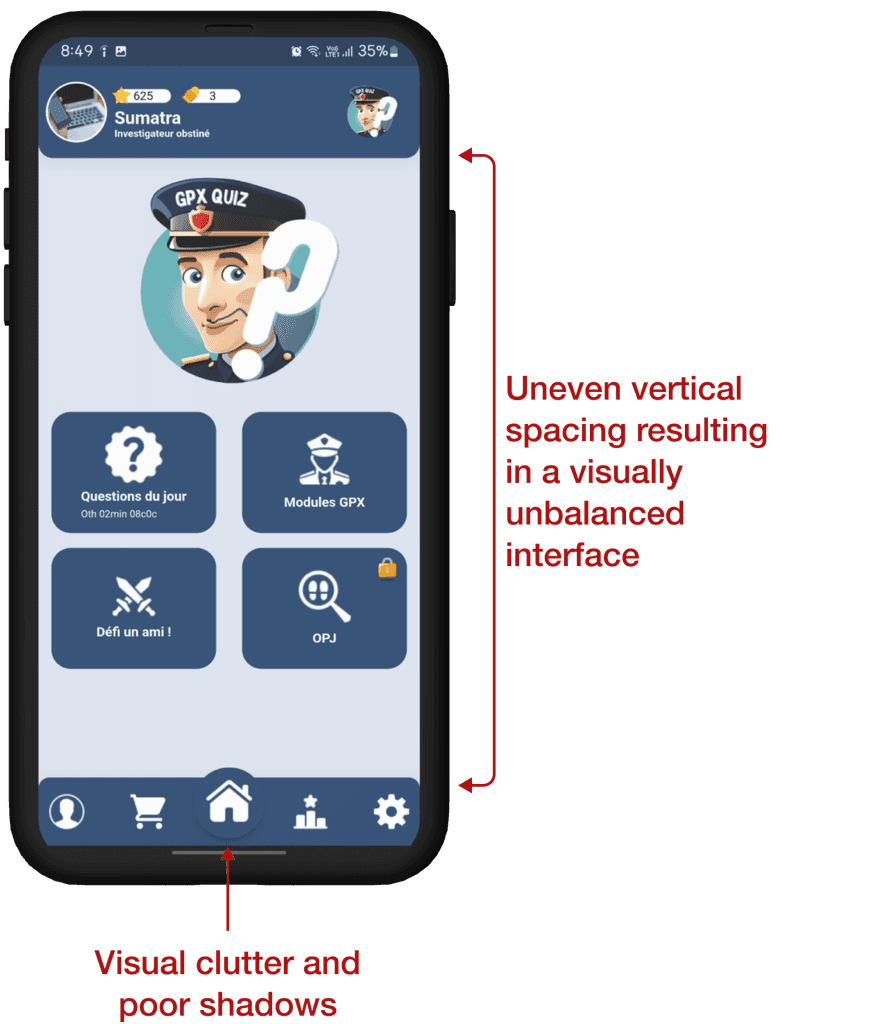
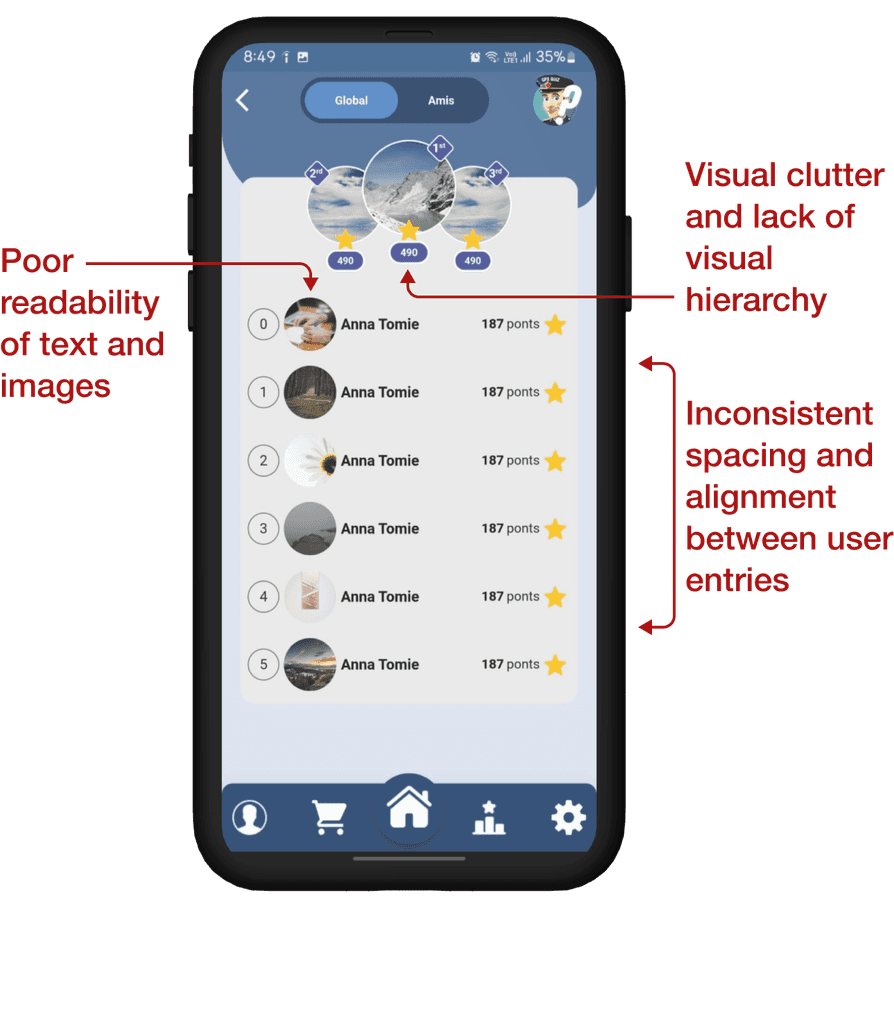
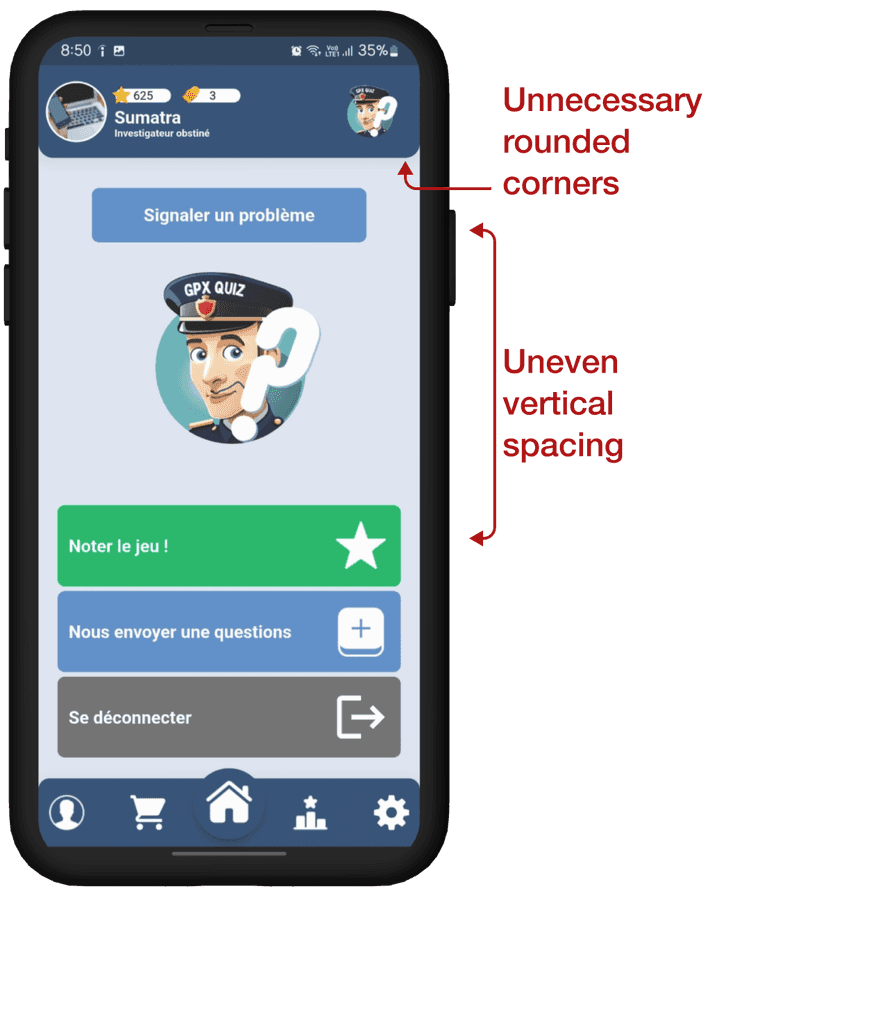
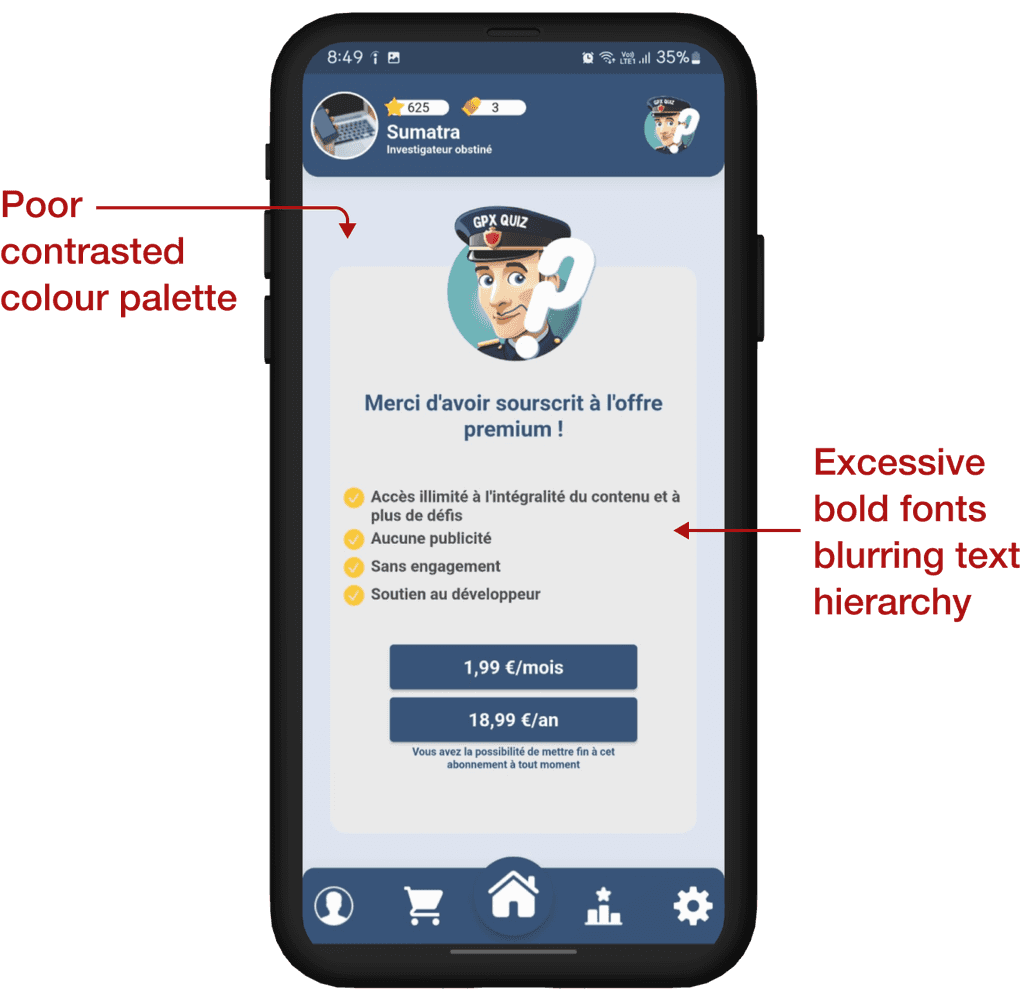
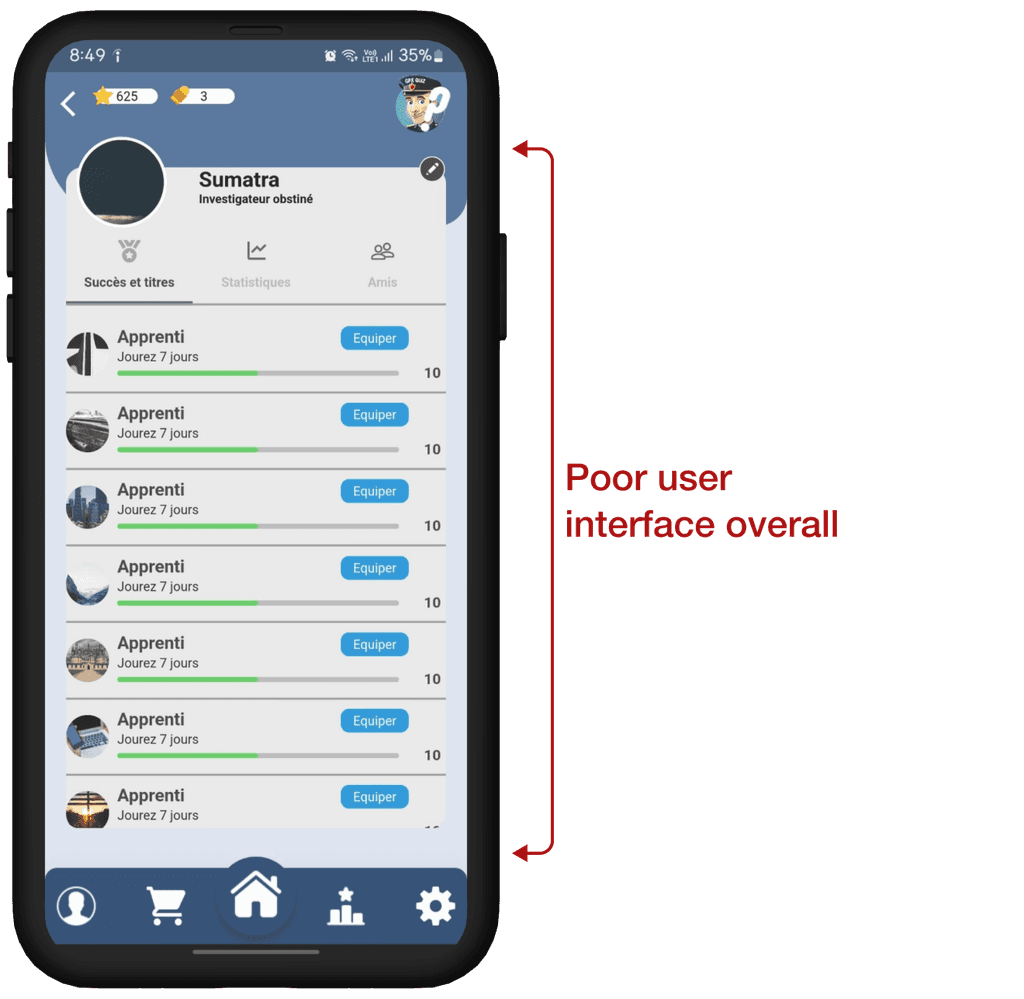
Heuristic Evaluation of the User Flow
The existing user panel lacked a cohesive design system, featuring poor UI elements and significant issues in text and space hierarchy. The cluttered and visually overwhelming layout not only hindered usability but also failed to meet accessibility standards, creating friction in user interactions. Recognizing the limitations, I knew I had to initiate a complete redesign, rebuilding the interface from the ground up.

Ideation Phase
Brainstorming the Blueprint
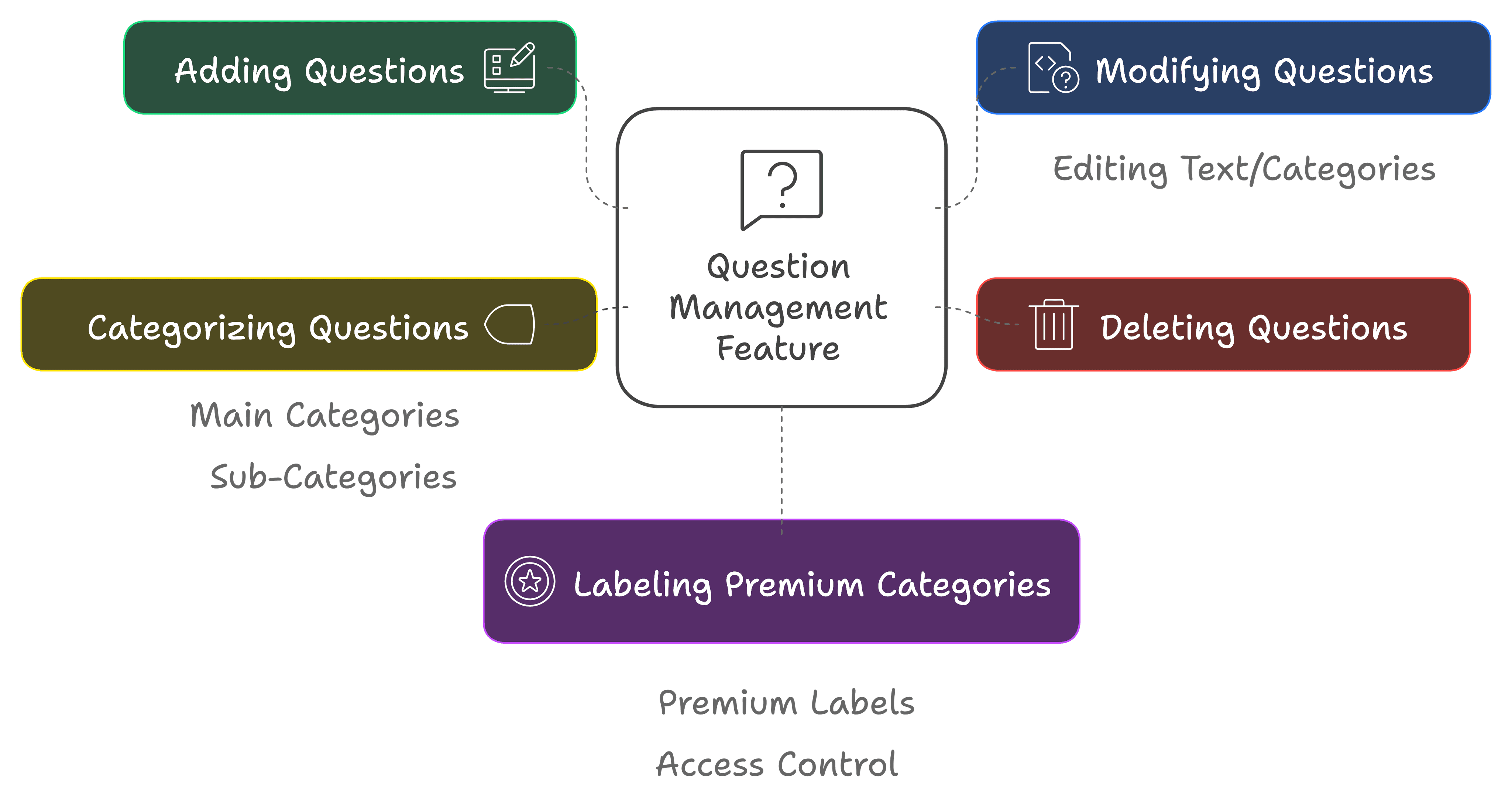
I began with an initial blueprint, reimagining the admin panel, focusing on the app's core functionalities as per client’s requirements, particularly the question management feature. Key aspects included:
A well-structured layout to prioritize essential tasks.
Intuitive interaction patterns to minimize cognitive load.
Responsive and scalable components for flexibility across devices.
Simplified workflows tailored to optimize efficiency for administrators.
Question Management : Functional Breakdown
Other essential screens:
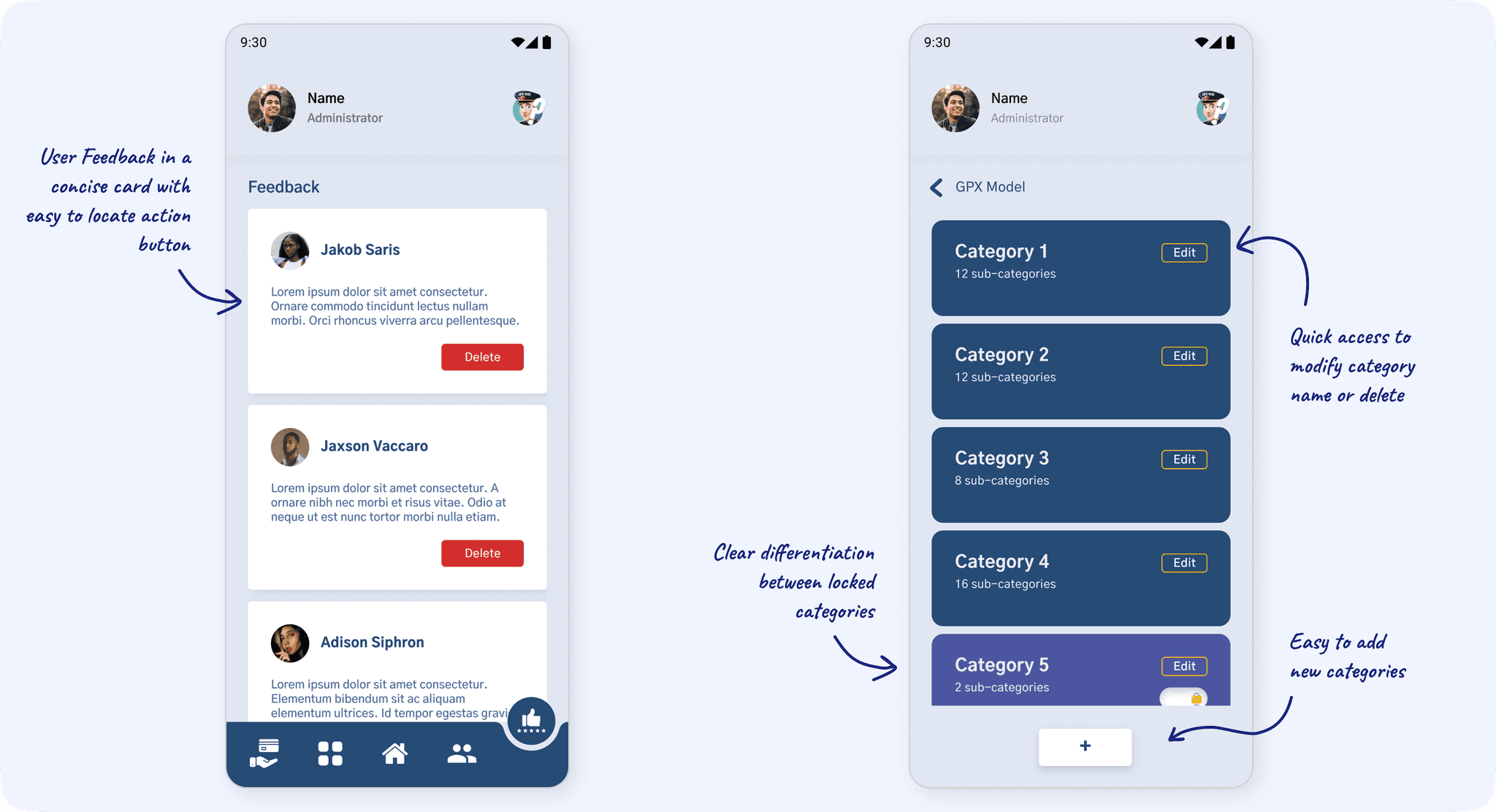
Homepage : A central hub for navigation and quick access to key features.
Feedback Window : A dedicated space for users to provide feedback and report issues.
Subscription Data Window : Displaying detailed subscription information, including earnings and transaction history.
Key Interaction Points for Core Features
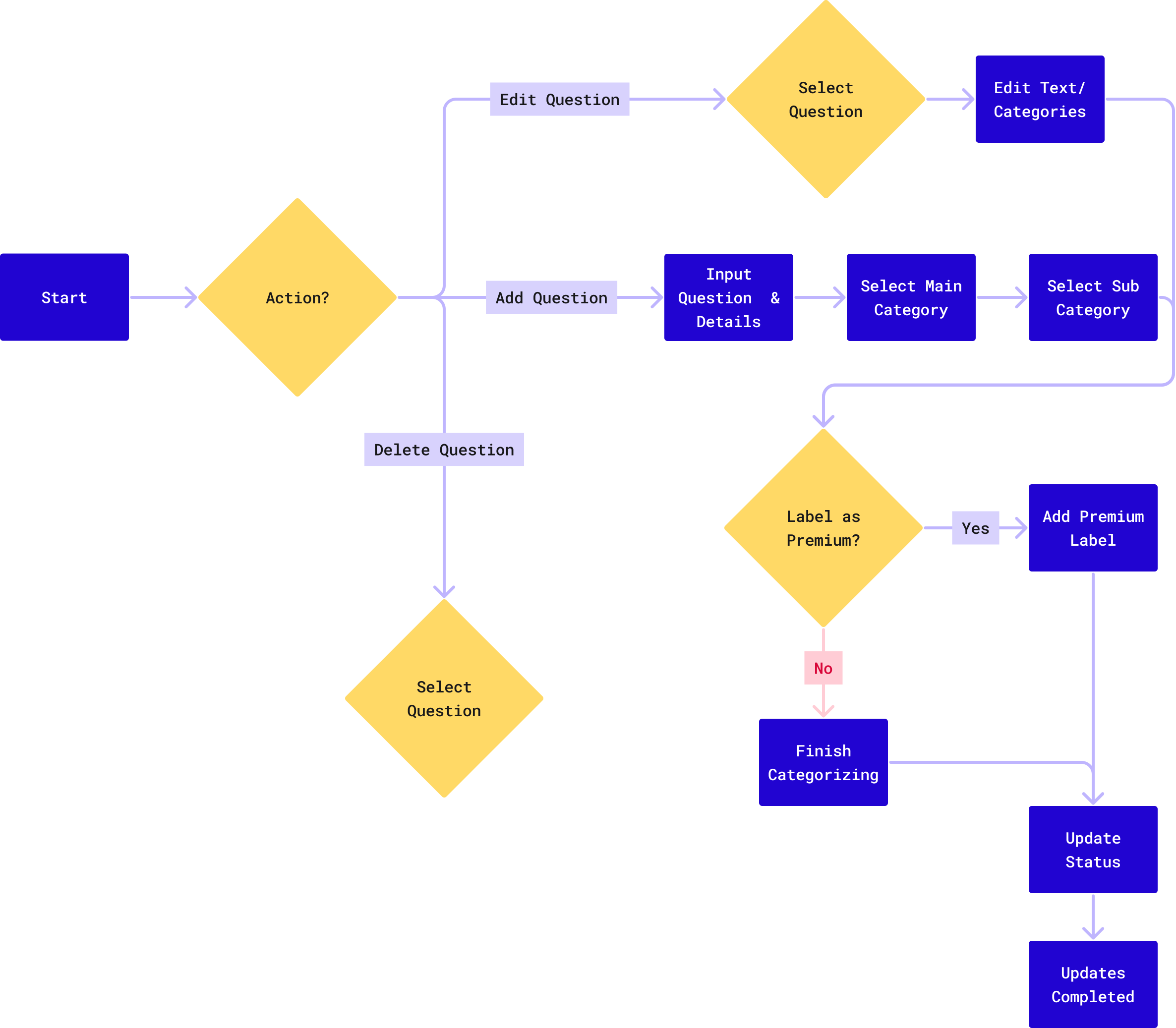
In designing the Question Management flow, I focused on making the process seamless. Adding, editing, or deleting questions is straightforward, with categorized inputs, optional premium labeling, and quick status updates. The flow ensures administrators can manage large question banks effortlessly.
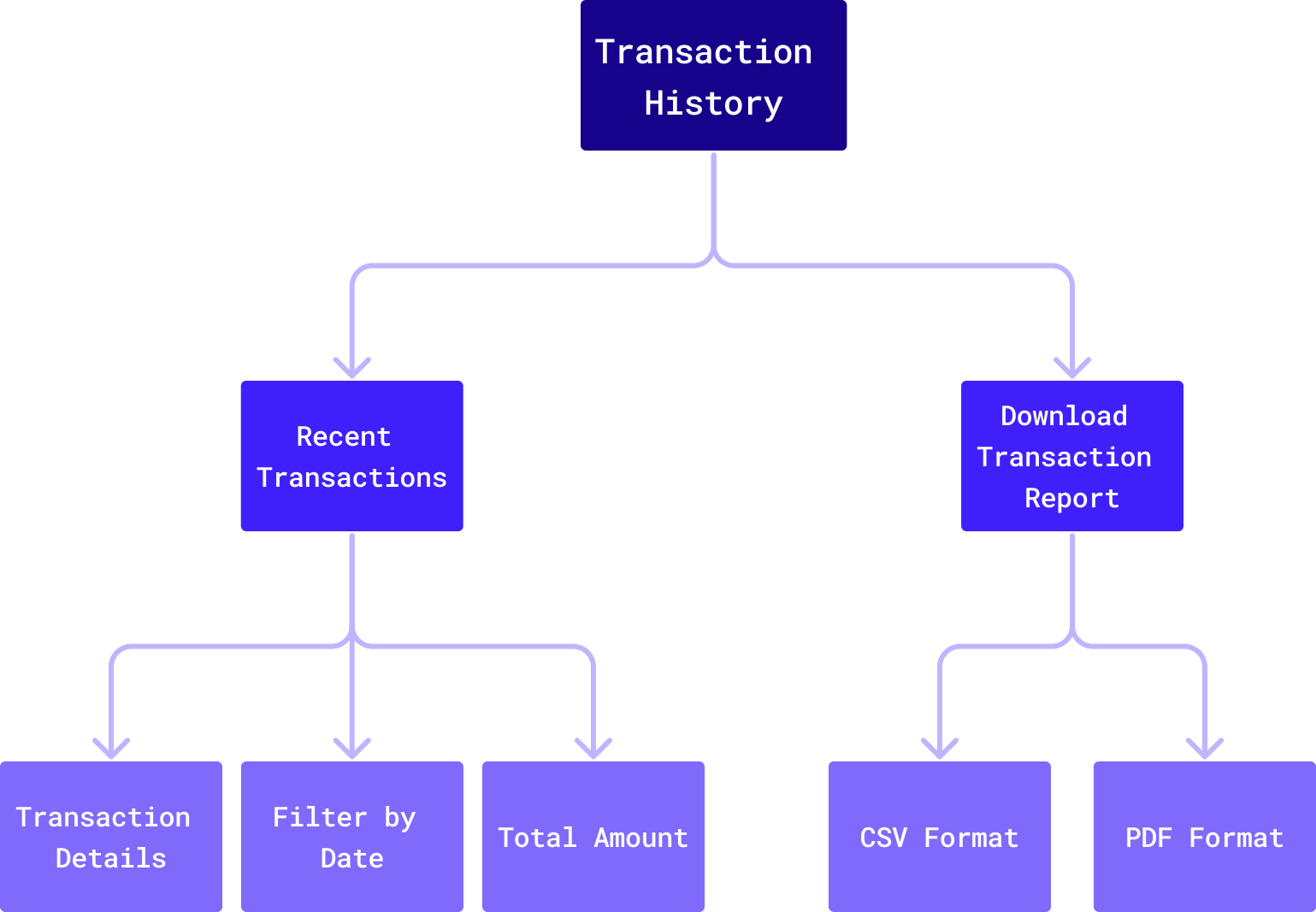
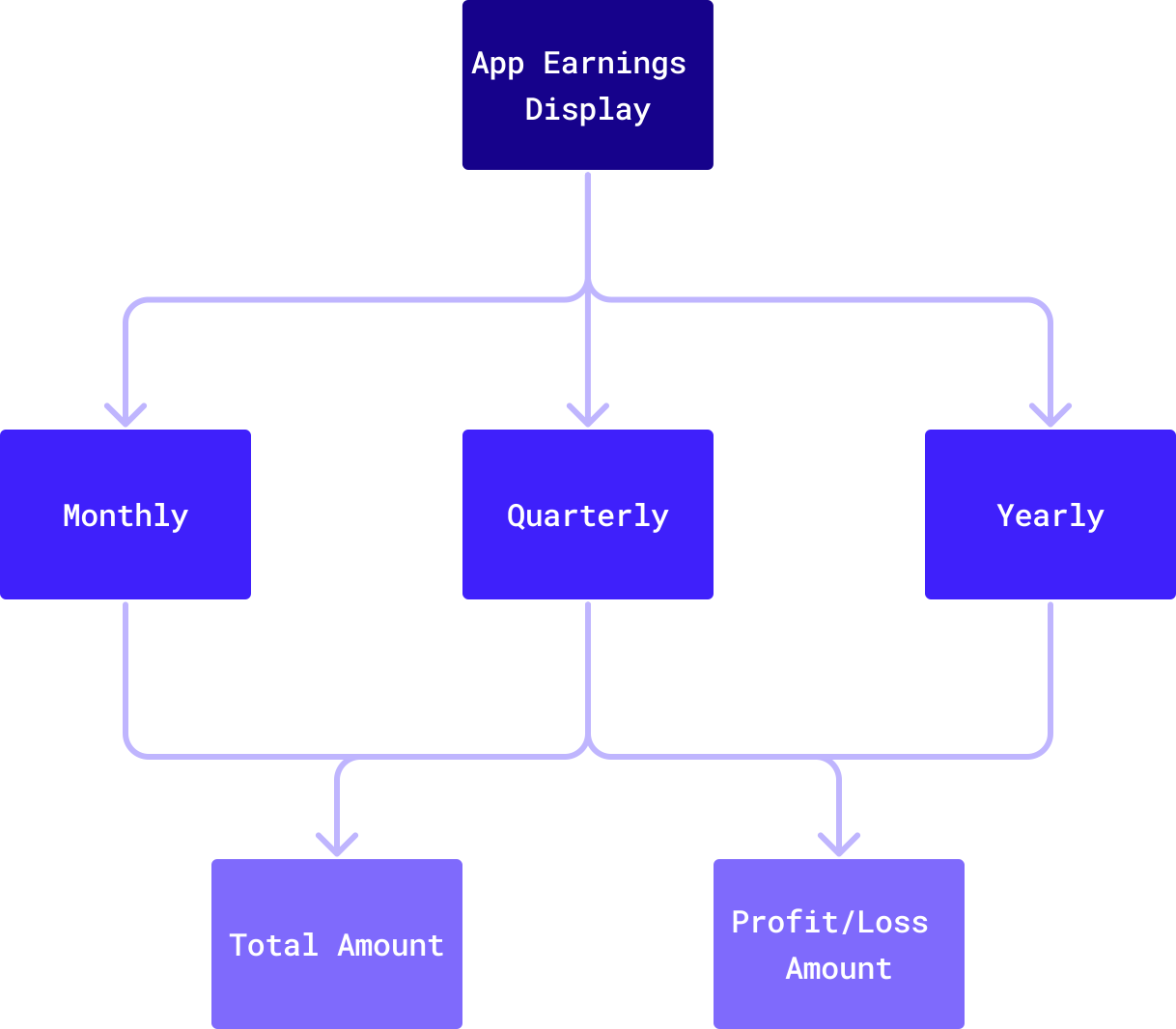
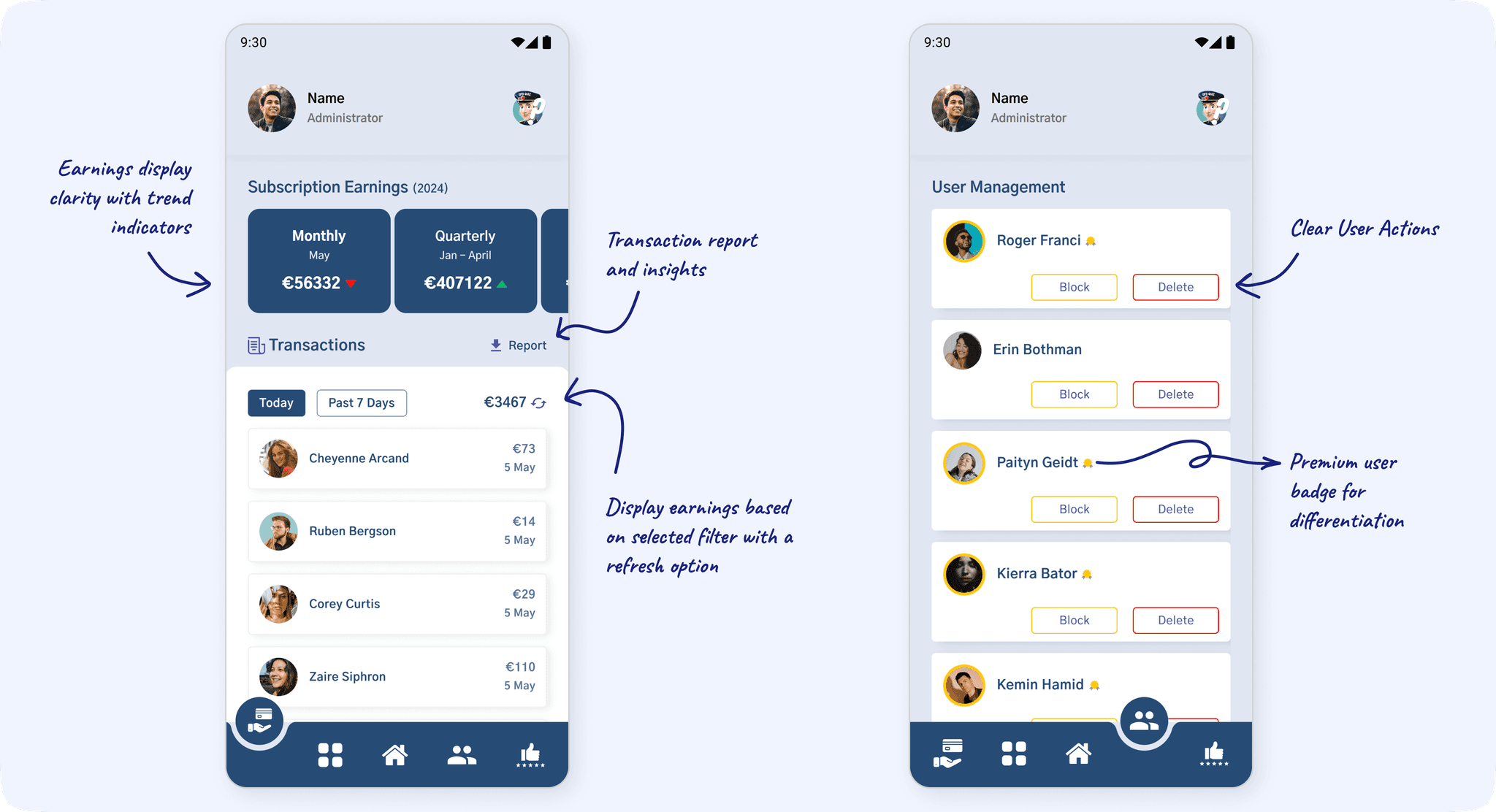
For Transaction Data, I prioritized clear navigation, enabling users to view recent transactions, filter by date, and download reports in CSV or PDF formats. The Earnings Display organizes revenue insights into monthly, quarterly, and yearly views, providing quick access to totals and profits for better decision-making.
Question Management
Transaction Data & App Earnings
Building the Backbone with Information Architecture
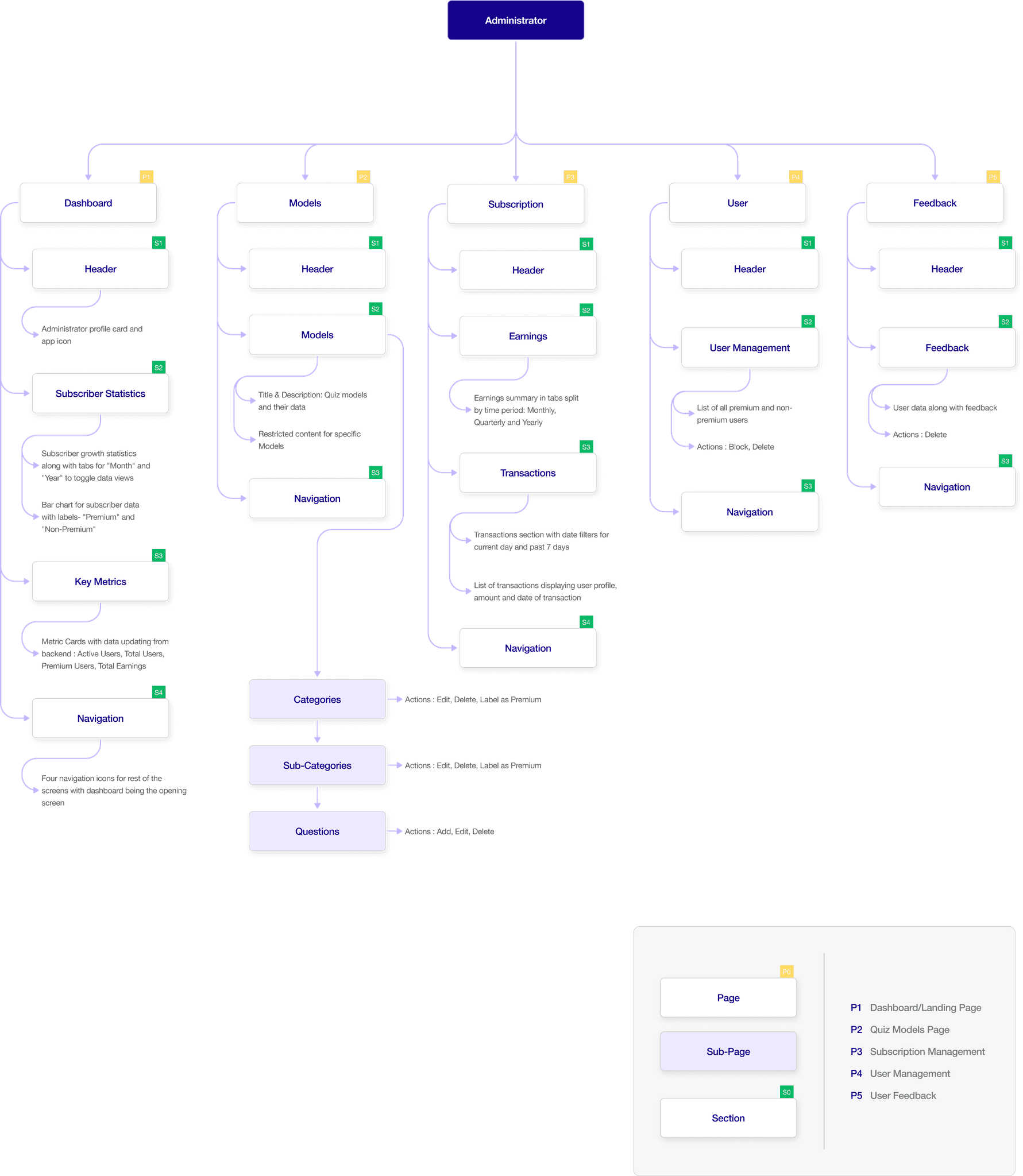
Through multiple client interviews and collaborative discussions, I identified distinct patterns and specific needs that later became the foundation for the app's information architecture (IA). This process led to the creation of five main screens, each with well-organized sub-screens and navigation pathways.
Given the app's data-intensive nature, I focused on establishing a clear and logical hierarchy, ensuring the admin could easily navigate between screens and sub-screens without feeling overwhelmed. The goal was to create an experience where complex data could be managed effortlessly, with each interaction feeling natural and streamlined.
Design Phase
Visualizing Ideas with Early Wireframes
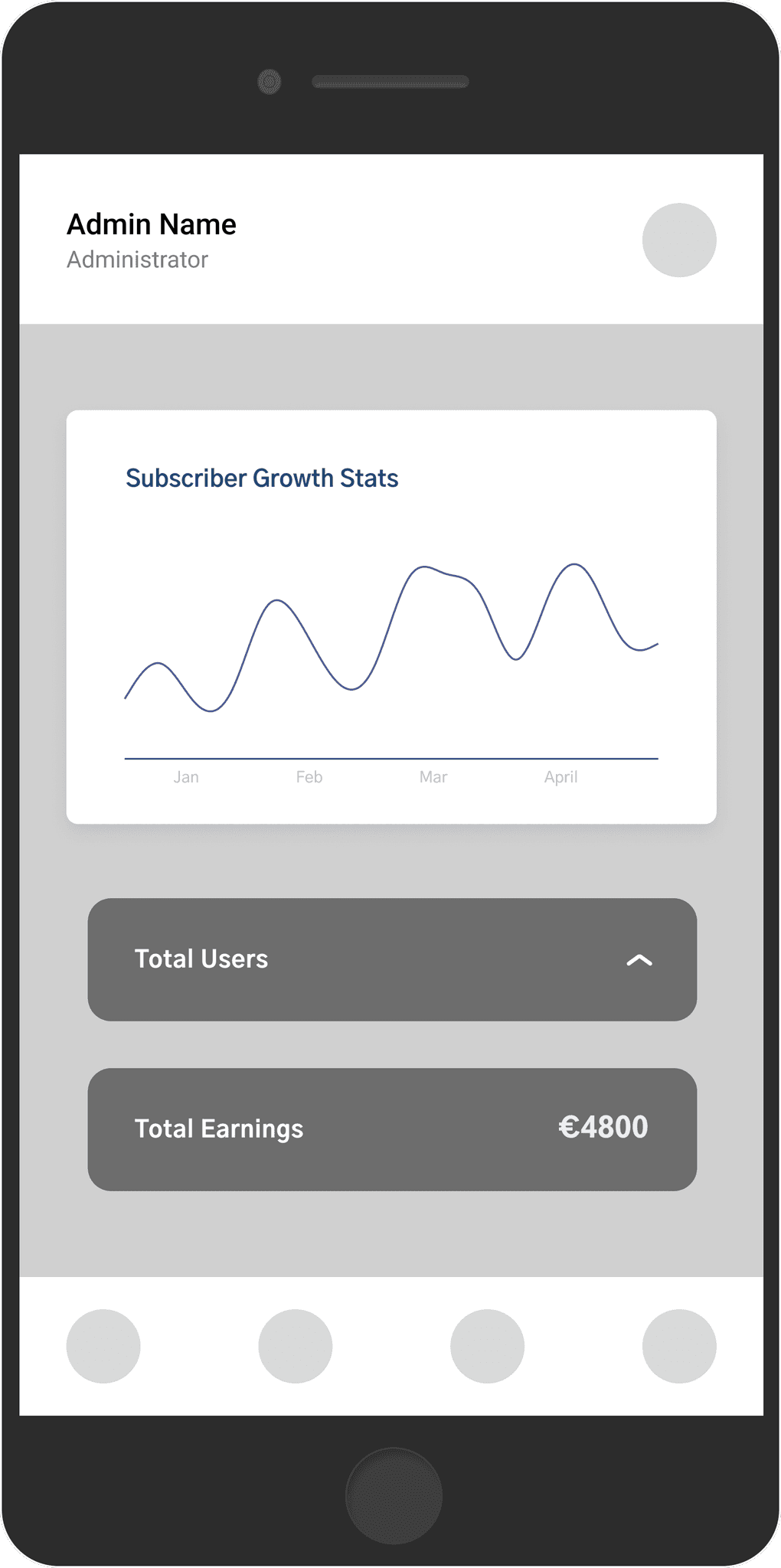
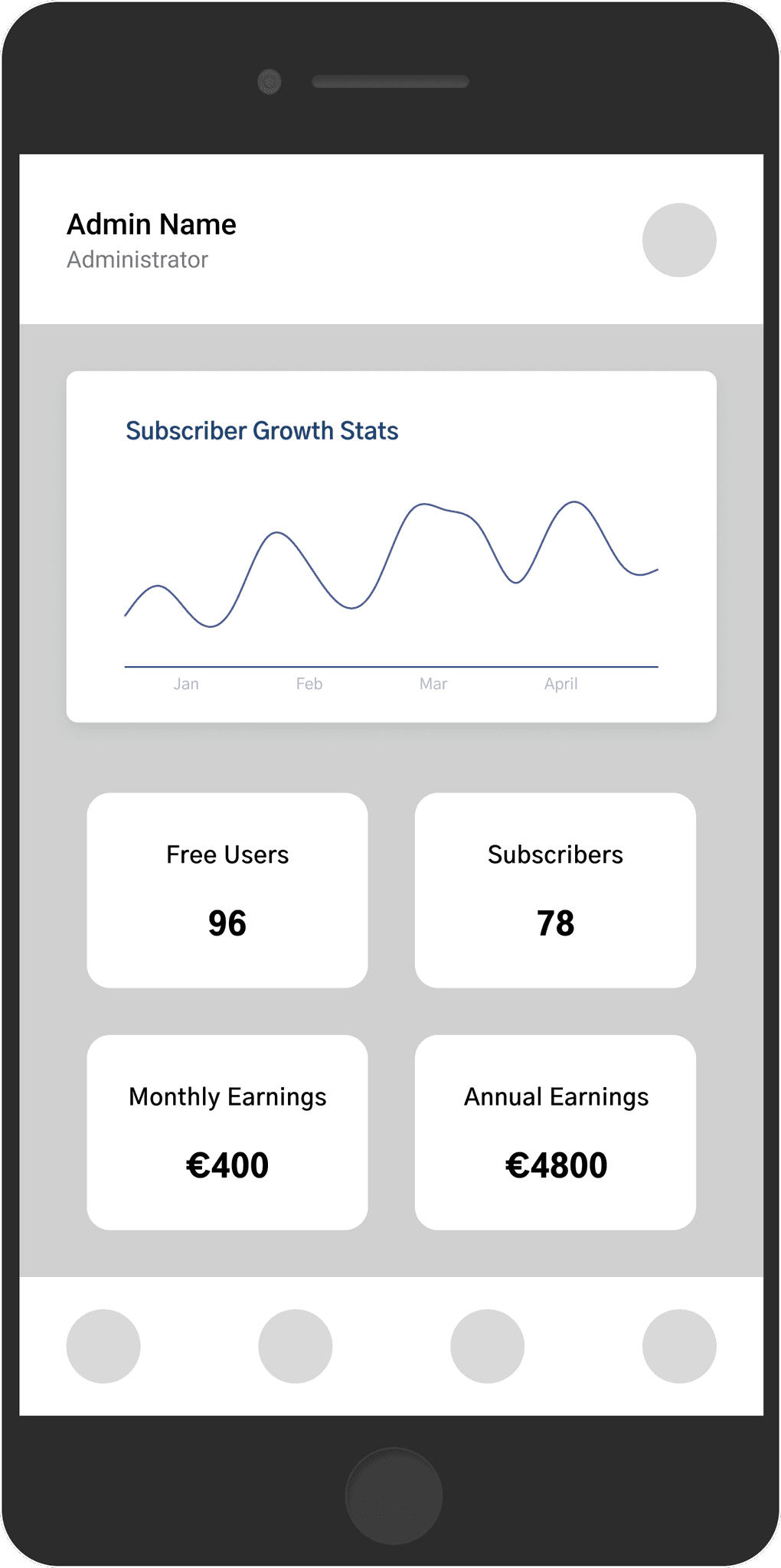
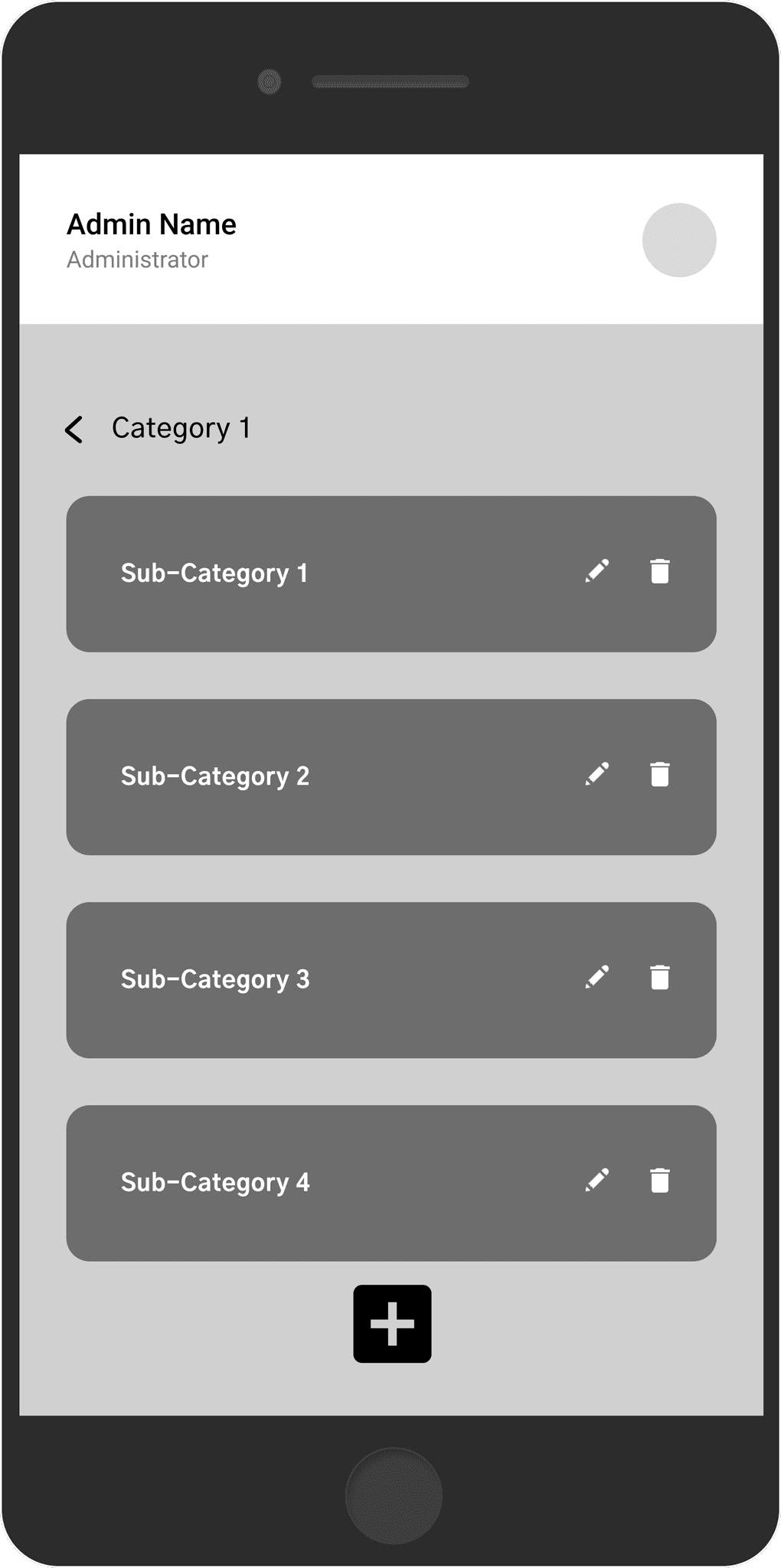
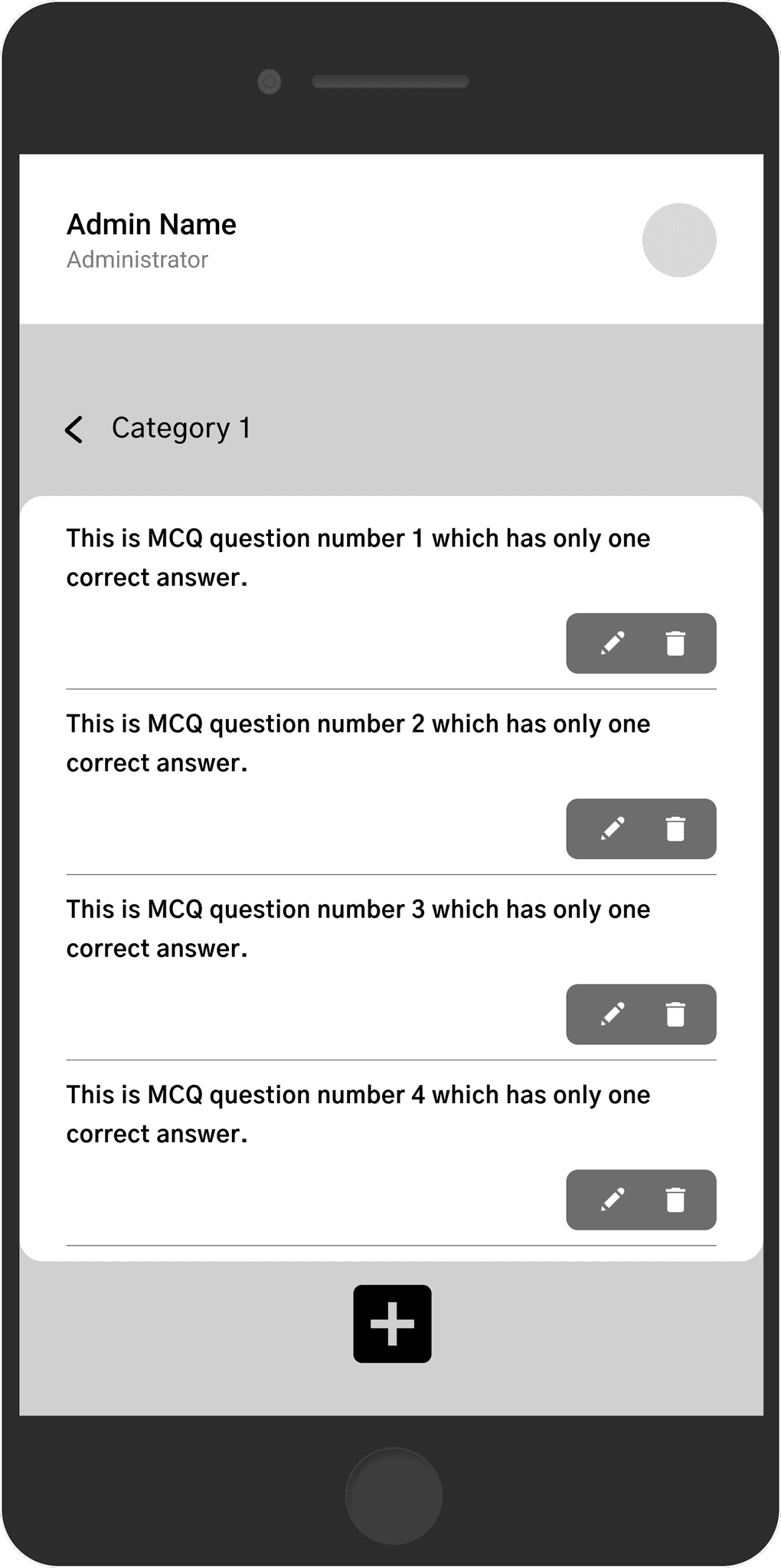
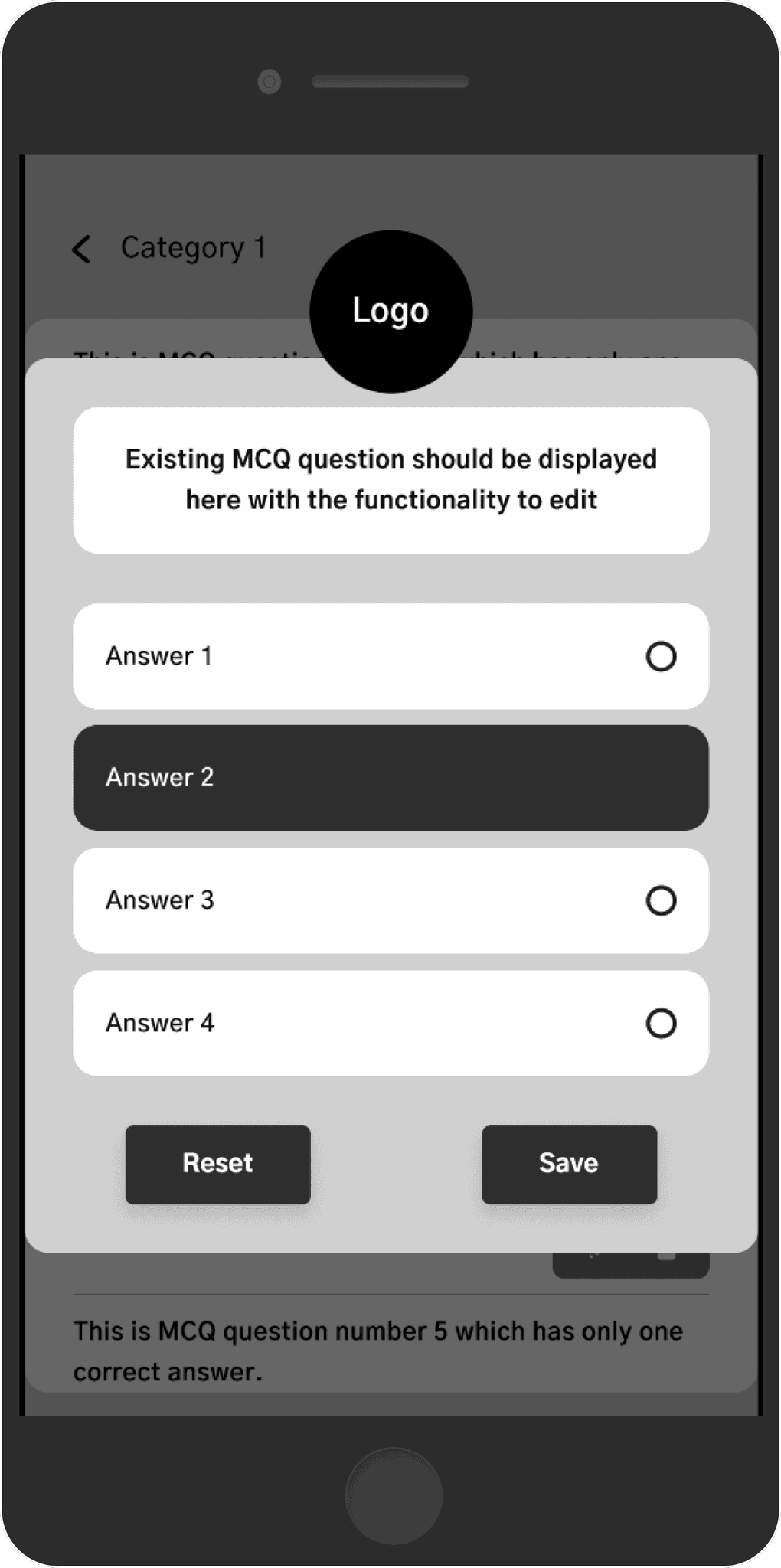
To bring the concept to life, I started with early wireframes, focusing on functionality and layout. Below were the wireframes presented to the client which went through multiple iterations before being tranformed into final designs.
Dashboard
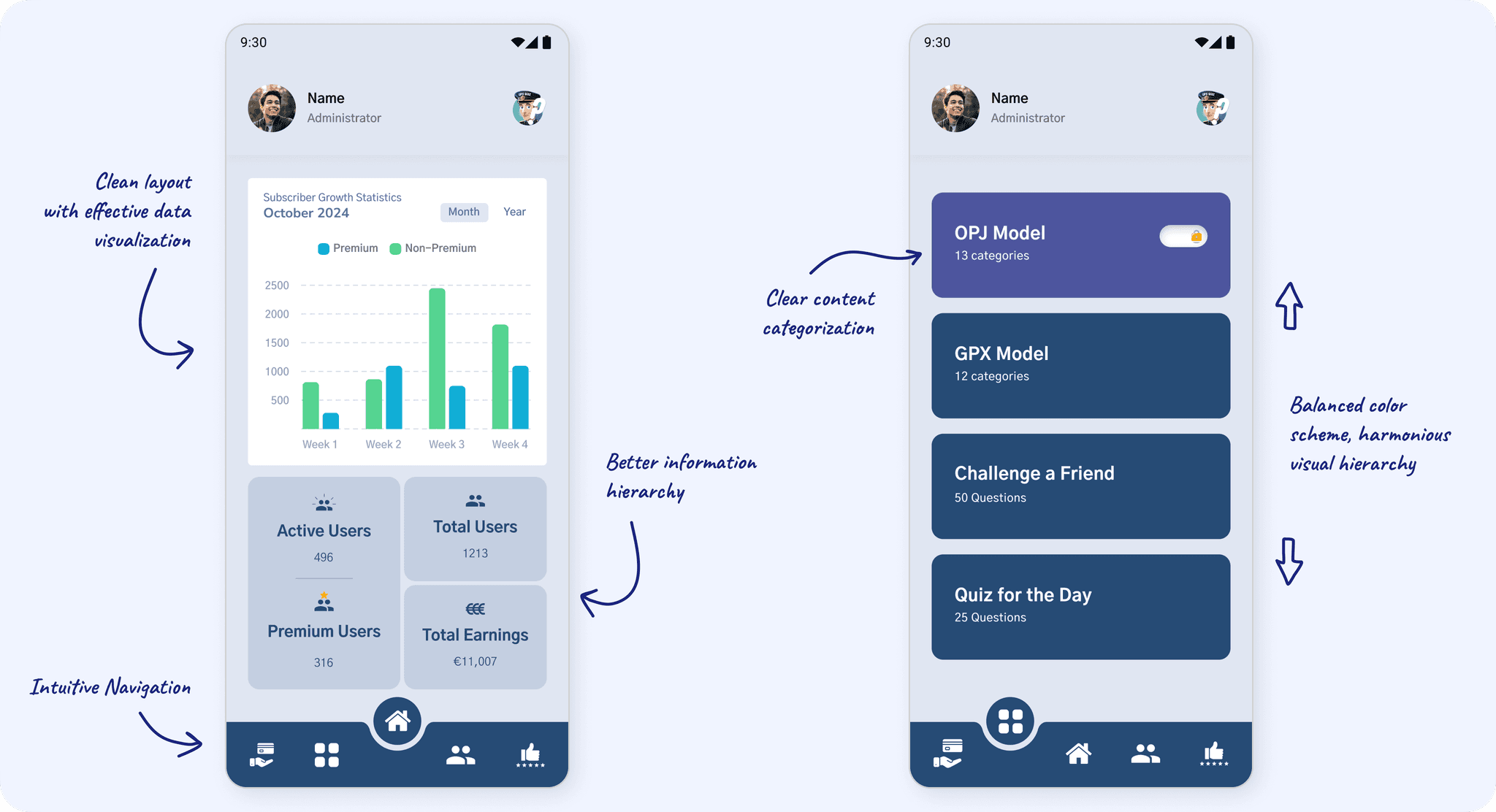
Subscription statistics, key metrics like total users, active vs. inactive subscriptions, & monthly earnings.
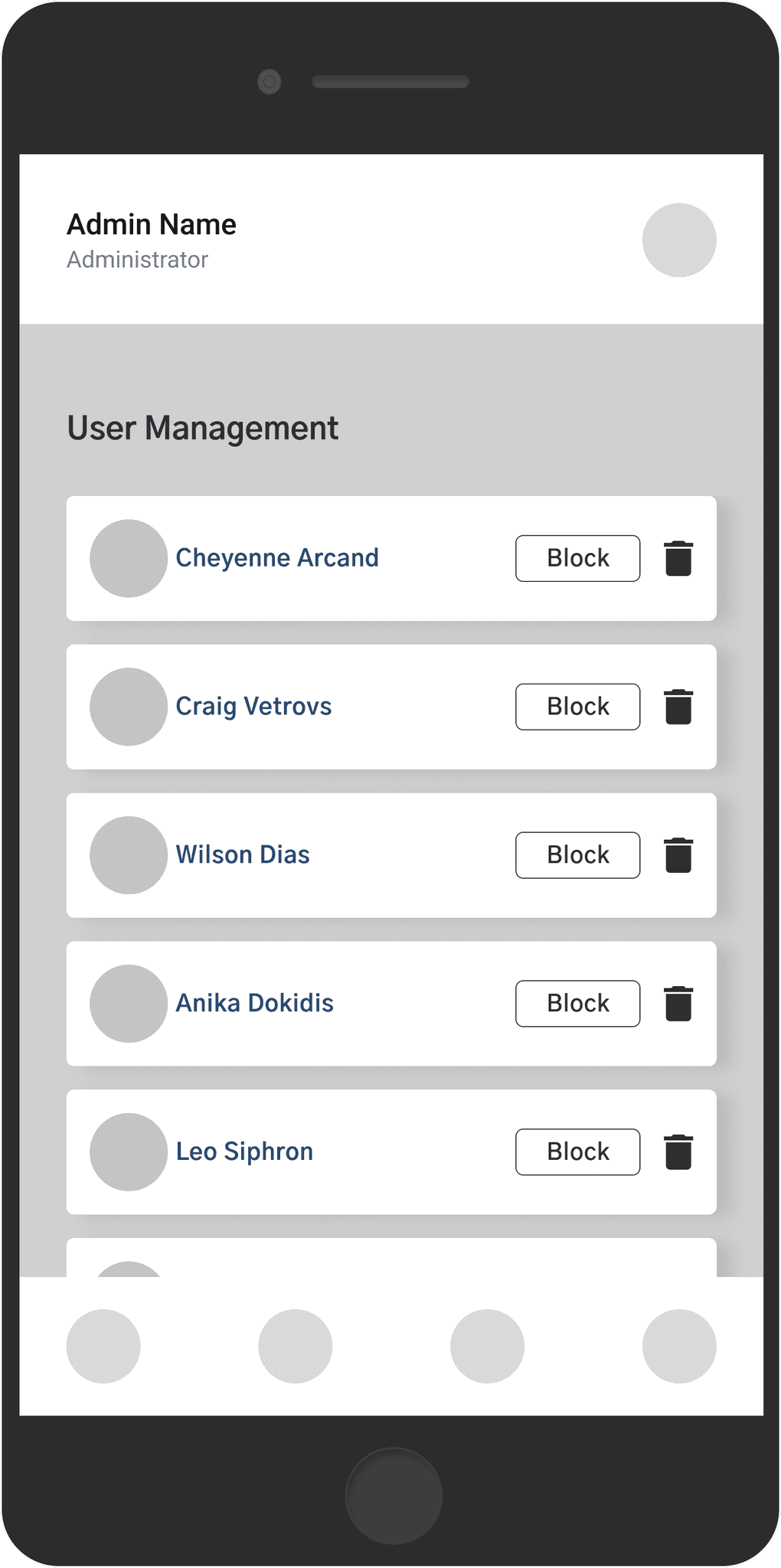
User Management
A list of users with direct control over user access to enhance administrative efficiency in managing the user base.
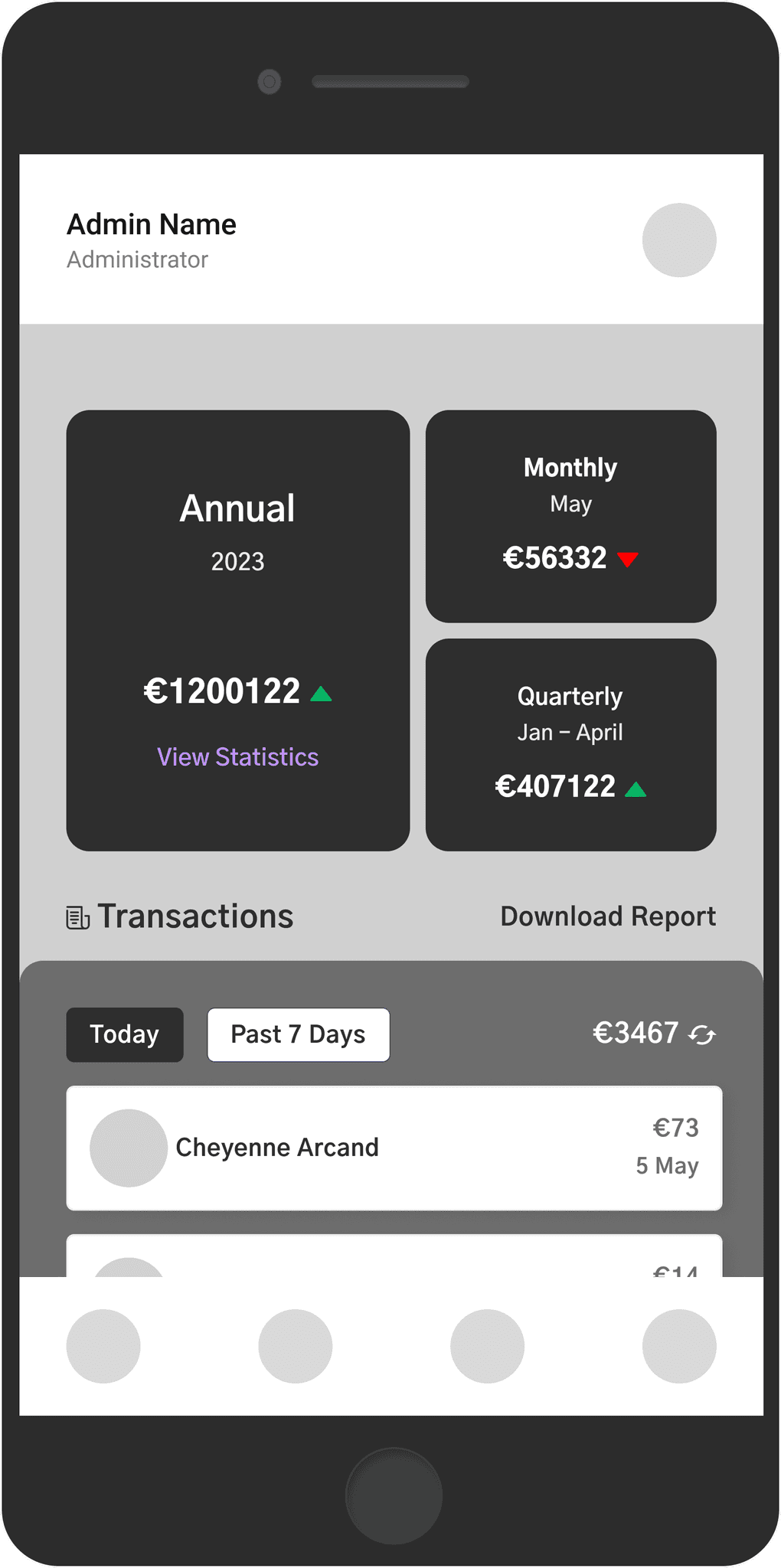
Subscription Management
Overview of earnings & other features for efficient tracking of subscription revenue & user payments.
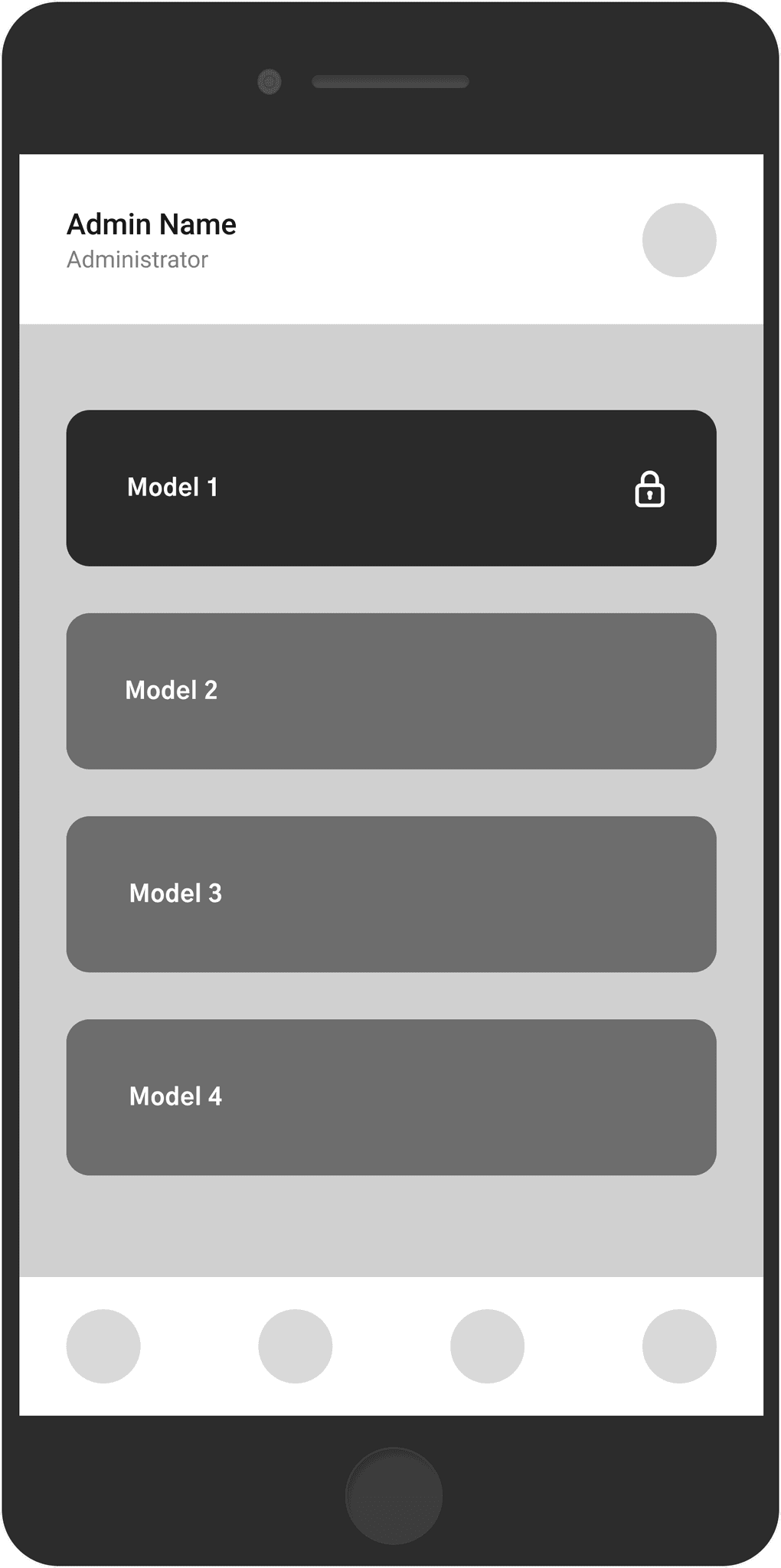
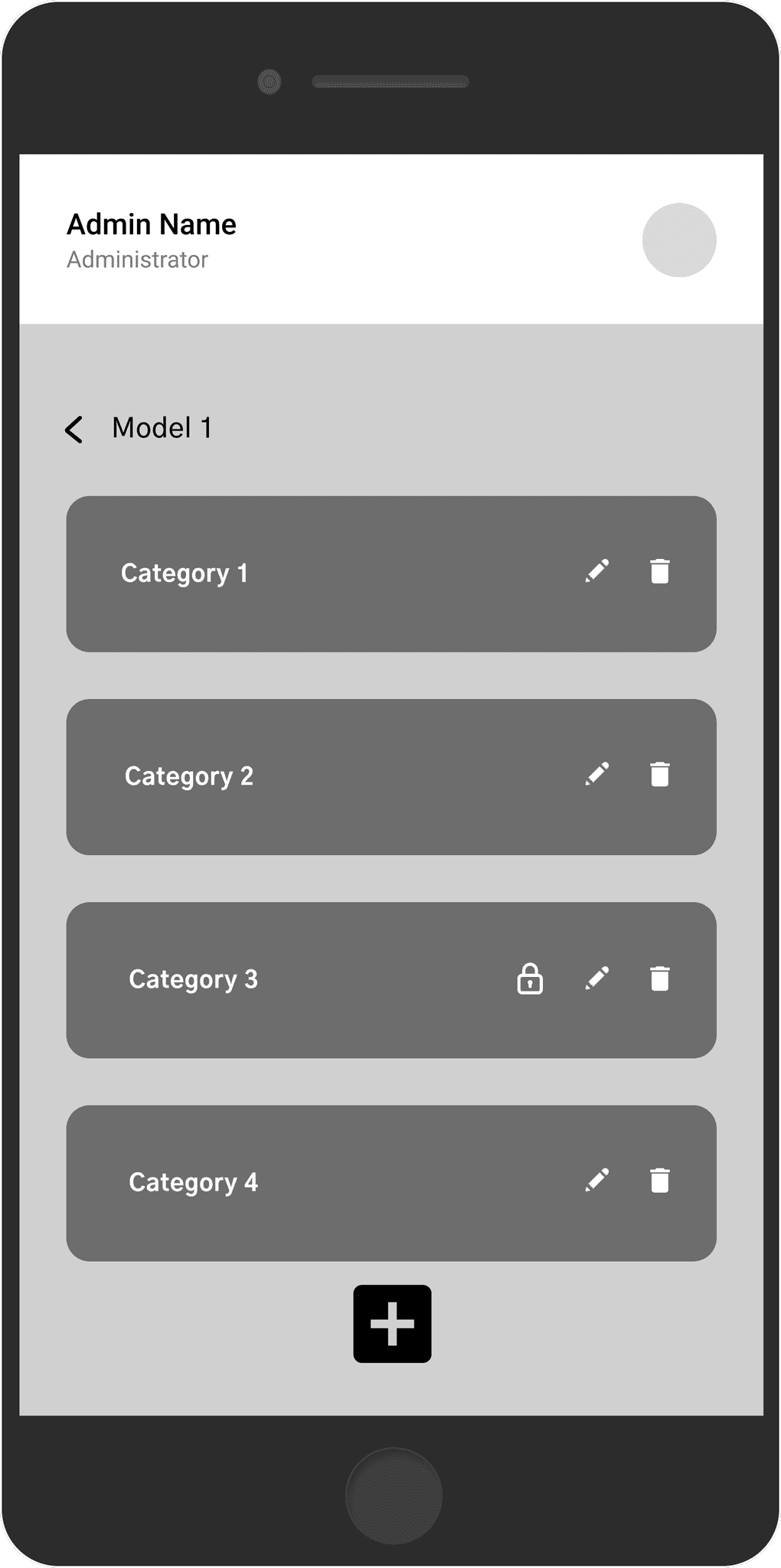
Question Management
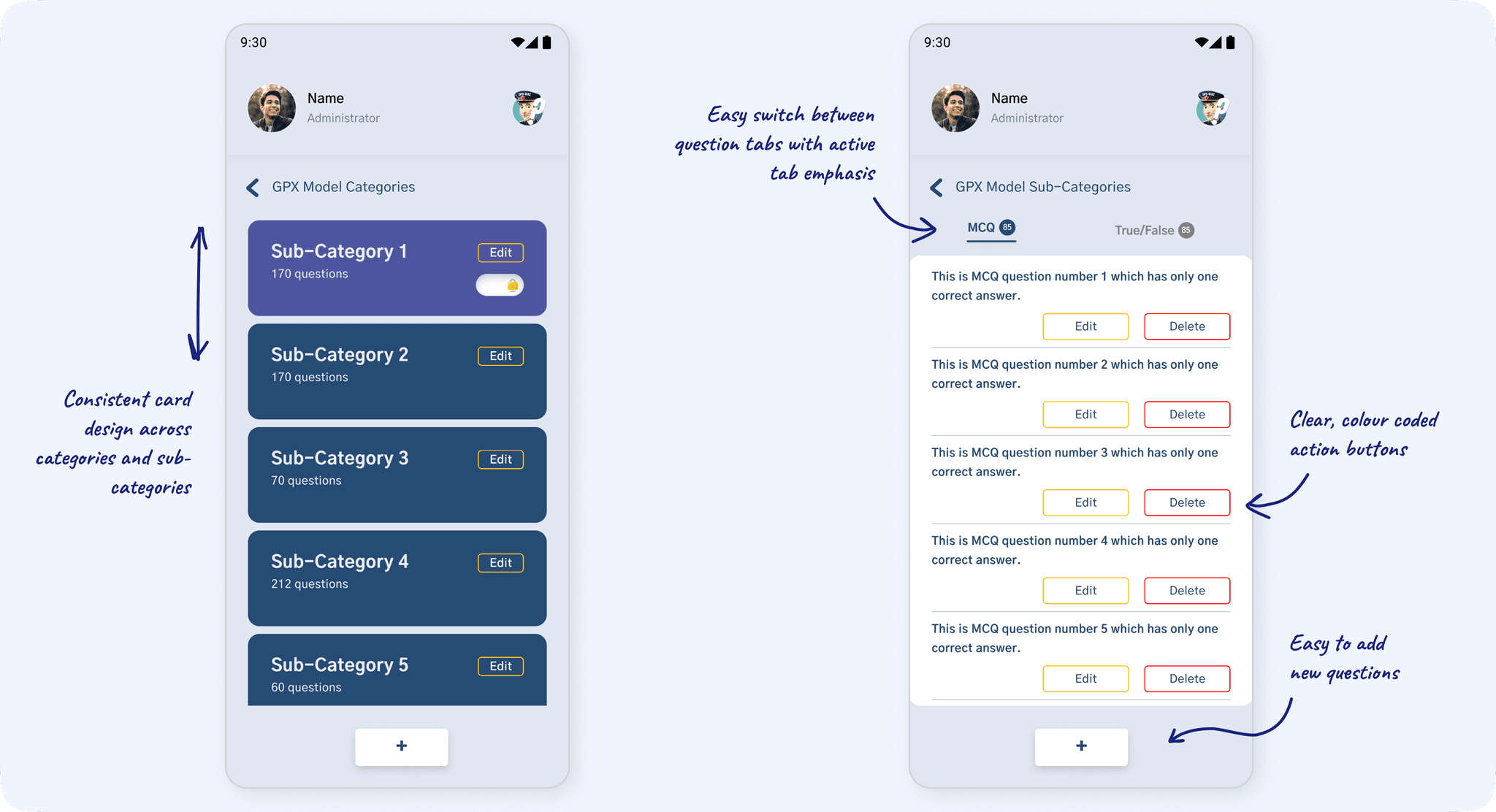
A flow that enables admin to navigate models and categories, view, edit, or delete questions and lock features for premium access. Administrators can select and modify question details, such as the correct answer within the interface.
Usability Testing and Iterative Feedback
To ensure the admin panel design met the client’s expectations, I conducted informal usability testing. The client interacted with a clickable prototype of initial wireframes during multiple iterations, offering direct feedback. This highlighted certain pain points, such as the complexity of navigating through subscription management and the need for clearer visual indicators for premium questions. Based on this input, I made the following changes:
Simplified the navigation flow for subscription-related tasks by introducing a hierarchical structure for settings
Enhanced the Question Management interface by adding distinct labels for premium questions and implementing visual indicators for ease of recognition
These changes not only resolved usability issues but also ensured a smoother, more intuitive workflow for the client
The Design Identity
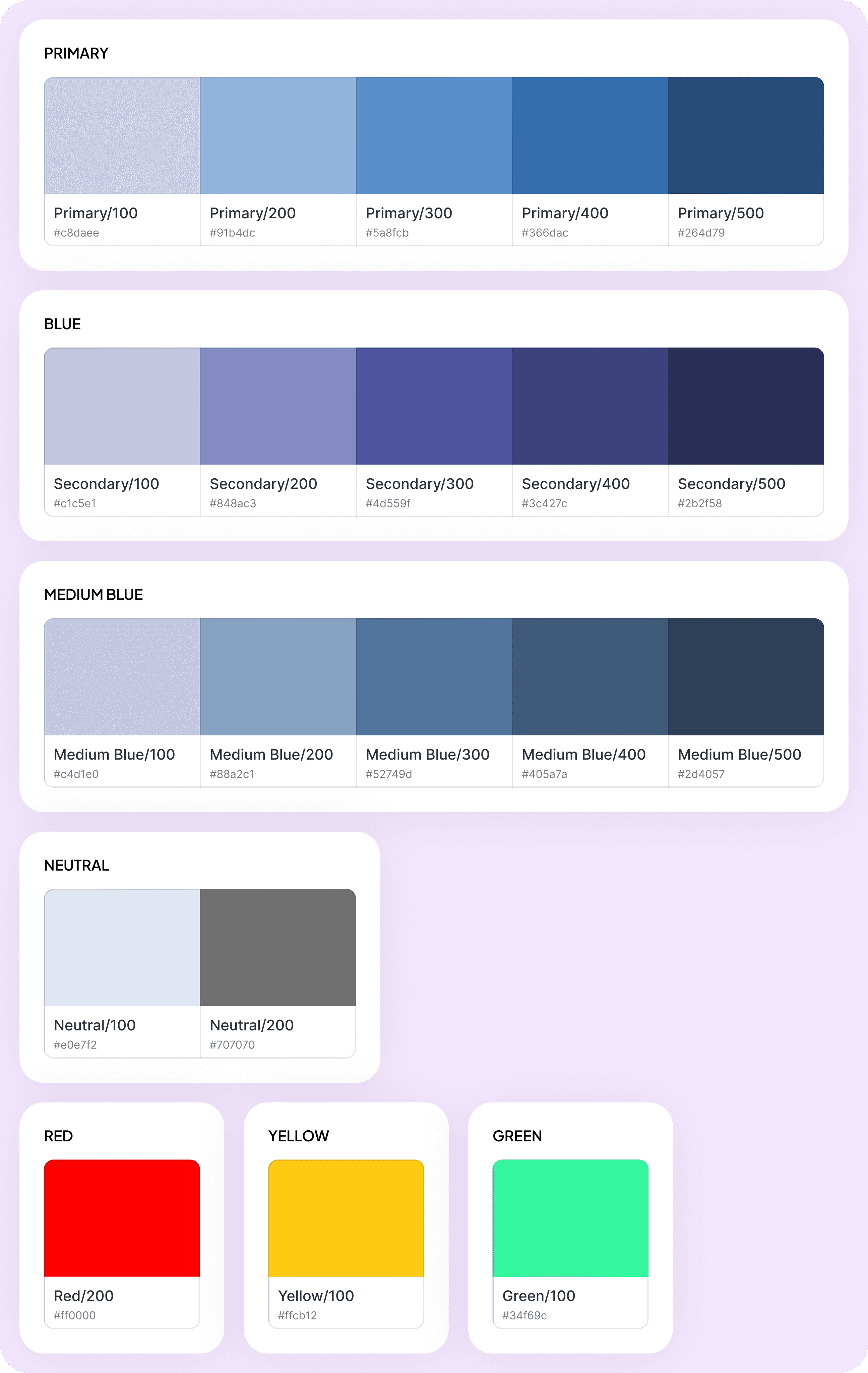
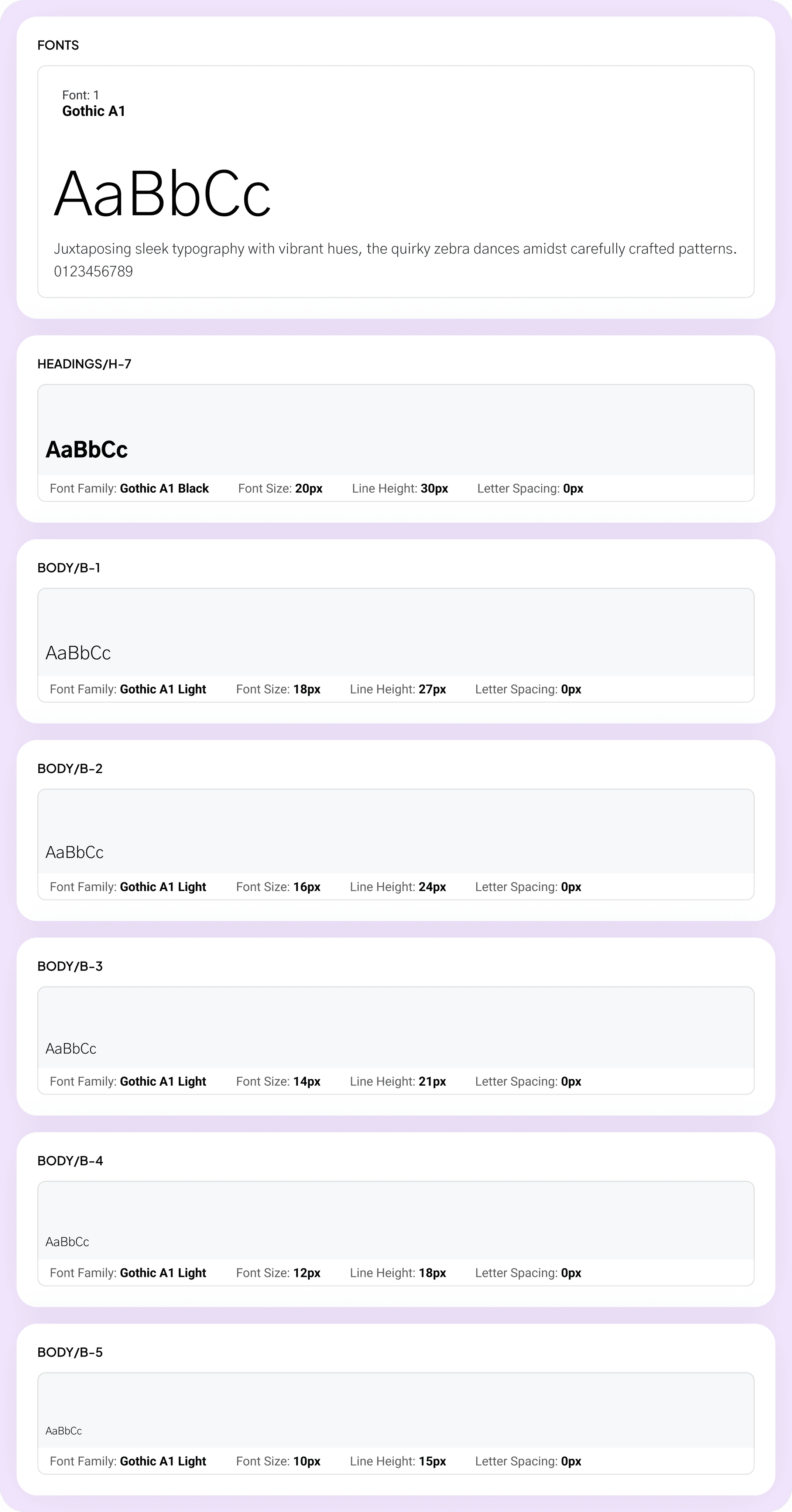
The client’s existing primary color and font style provided a solid foundation, accelerating the design process. Building on this, I expanded the palette with complementary shades and introduced high-contrast accent colors to highlight alerts and key actions. For typography, I carefully defined font sizes and line heights to establish a clear visual hierarchy, ensuring content was easy to scan and interact with. These decisions enhanced both aesthetics and functionality, creating a cohesive and accessible design.
Final Designs: Bringing It All Together
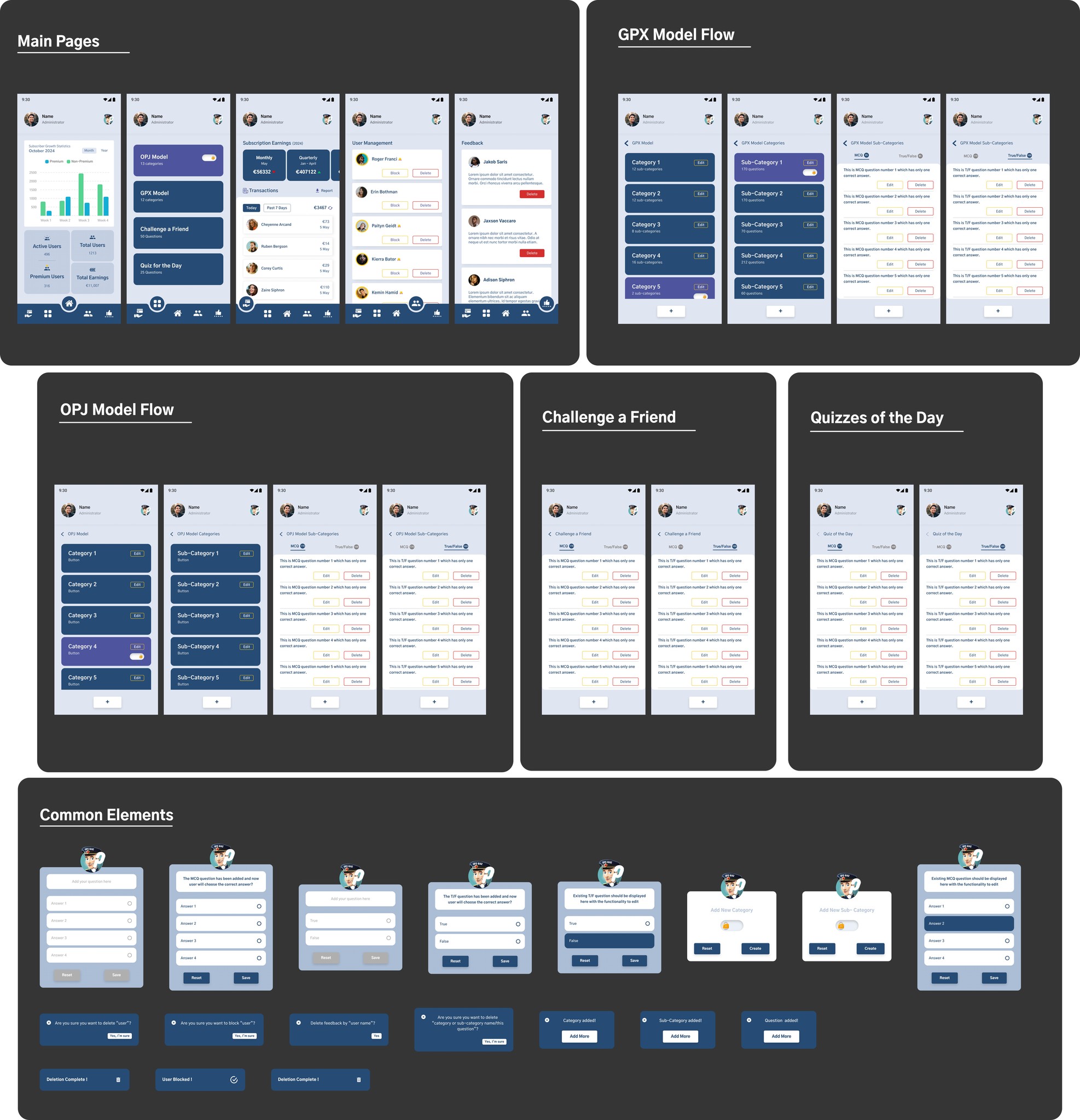
After presenting and refining the wireframes based on the client’s feedback, we finalized the designs. This marked the beginning of the iterative testing and development phase. The final designs integrate all components into a cohesive system, aligning functionality with an intuitive user experience.
Main Pages
These serve as the central hub, providing admin with seamless navigation between key features such as analytics, models, and settings. Each page emphasizes clarity and accessibility.
GPX and OPJ Model Flows
Designed for efficiency, these flows streamline complex tasks into clear, step-by-step processes. Admin can easily categorize, configure, and manage data without unnecessary friction.
Challenge a Friend & Quizzes of the Day
These features enhance engagement through interactive and dynamic question addition on a daily basis, encouraging users to participate actively and build a routine around the app.
Common Elements
The consistency of forms, buttons, and interactions ensures a unified experience across all screens, reducing the learning curve and reinforcing familiarity.
After presenting and refining the wireframes based on the client’s feedback, we finalized the designs. This marked the beginning of the iterative testing and development phase. The final designs integrate all components into a cohesive system, aligning functionality with an intuitive user experience.
Main Pages
These serve as the central hub, providing admin with seamless navigation between key features such as analytics, models, and settings. Each page emphasizes clarity and accessibility.
GPX and OPJ Model Flows
Designed for efficiency, these flows streamline complex tasks into clear, step-by-step processes. Admin can easily categorize, configure, and manage data without unnecessary friction.
Challenge a Friend & Quizzes of the Day
These features enhance engagement through interactive and dynamic question addition on a daily basis, encouraging users to participate actively and build a routine around the app.
Common Elements
The consistency of forms, buttons, and interactions ensures a unified experience across all screens, reducing the learning curve and reinforcing familiarity.
GPX Quiz Admin Panel : Features and Design Up Close
Project Wrap-Up
Metrics of Success
With the design implemented and approved, I reflected on the impact of the project, assessing its ability to address the client’s pain points and optimize daily workflows.
Reflecting on the Impact
By addressing the challenges of a data-heavy admin panel with a focus on simplicity and usability, I created a system that is not only functional but also intuitive for administrators.
The client expressed satisfaction with the intuitive design and seamless integration of the admin panel into his daily workflow.
User conversion rates were boosted by 4% as a result of revamped user panel and managing usability issues.
The centralized admin panel eliminated the need for third-party APIs, reducing operational costs by 45% and providing the client with greater control over their content
What I Could Do with More Time
Conduct additional user testing to gather deeper insights.
Explore advanced features, such as customizable settings or enhanced analytics dashboards.
Iterate more on visual design to push the interface’s aesthetics and functionality.
GPX Quiz
Designed the administrator panel for a quiz app with a seamless flow for handling subscriptions, user details, and feedback for a French client.
My Role
UX Designer
Team
1 Stakeholder
2 Developers
1 UX Designer
1 Project Manager
UX Methods
Ideation
Wireframing
Information Architecture
Visual Design
Interaction Design
About GPX Quiz
GPX Quiz is an online education app tailored for individuals preparing for the police department examination in France. It aligns with the latest syllabus and question patterns. While the user flow was available on Google Play Store, the growing user base required an administrator panel for enhanced control and management. Additionally, the owner introduced paid models, requiring users to subscribe and pay a fee for access. This led to the need for a separate administrator panel to manage subscriptions and related functionalities effectively.
Discovery Phase
Understanding the Client's Vision
The client and our team aligned on key requirements for the GPX admin panel, including a homepage, feedback management, subscription management, and a system to add questions categorized by specific models.
During multiple client interviews, we clarified his vision and discovered that scalability wasn’t a concern. His primary goal was to efficiently manage the GPX Quiz user panel, which featured multiple question models across various categories. He also sought suggestions for integrating user feedback, especially from paid users, to address updates like syllabus revisions or question additions.
Observational Research
Beyond discussions, I observed how the client interacted with the existing system to identify workflow inefficiencies. For instance, redundant navigation steps and unclear categorization processes in the user panel caused unnecessary delays. These insights were pivotal in imagining the admin panel's flow to ensure a more streamlined experience.
Team Brief
The developers and I collaborated on creating an efficient, minimalist design. Given the density and detail of the data to be added into the admin panel, our goal was to streamline its functionality. We aimed to keep both the process and the design straightforward to ensure tasks could be completed with less hassle and more efficiency.
As the head of design for this project, I dove in by thoroughly analyzing the existing user flow to identify areas of improvement and key strengths. This analysis helped me pinpoint which elements from the existing design should be excluded from the admin panel, ensuring alignment with the client’s preference for maintaining the same layout as the user panel.
Previously, questions were integrated through third-party APIs, which limited his control over the content and restricted modifications. This approach also led to increasing costs. The admin panel aimed to resolve these issues, offering a centralized, cost-effective solution with complete content control.
Heuristic Evaluation of the User Flow
The existing user panel lacked a cohesive design system, featuring poor UI elements and significant issues in text and space hierarchy. The cluttered and visually overwhelming layout not only hindered usability but also failed to meet accessibility standards, creating friction in user interactions. Recognizing the limitations, I knew I had to initiate a complete redesign, rebuilding the interface from the ground up.
I began with an initial blueprint, reimagining the admin panel, focusing on the app's core functionalities as per client’s requirements, particularly the question management feature. Key aspects included:
A well-structured layout to prioritize essential tasks.
Intuitive interaction patterns to minimize cognitive load.
Responsive and scalable components for flexibility across devices.
Simplified workflows tailored to optimize efficiency for administrators.
Other essential screens:
Homepage : A central hub for navigation and quick access to key features.
Feedback Window : A dedicated space for users to provide feedback and report issues.
Subscription Data Window : Displaying detailed subscription information, including earnings and transaction history.
Ideation Phase
Brainstorming the Blueprint
Key Interaction Points for Core Features
In designing the Question Management flow, I focused on making the process seamless. Adding, editing, or deleting questions is straightforward, with categorized inputs, optional premium labeling, and quick status updates. The flow ensures administrators can manage large question banks effortlessly.
For Transaction Data, I prioritized clear navigation, enabling users to view recent transactions, filter by date, and download reports in CSV or PDF formats. The Earnings Display organizes revenue insights into monthly, quarterly, and yearly views, providing quick access to totals and profits for better decision-making.
Question Management
Transaction Data & App Earnings
Building the Backbone with Information Architecture
Through multiple client interviews and collaborative discussions, I identified distinct patterns and specific needs that later became the foundation for the app's information architecture (IA). This process led to the creation of five main screens, each with well-organized sub-screens and navigation pathways.
Given the app's data-intensive nature, I focused on establishing a clear and logical hierarchy, ensuring the admin could easily navigate between screens and sub-screens without feeling overwhelmed. The goal was to create an experience where complex data could be managed effortlessly, with each interaction feeling natural and streamlined.
To bring the concept to life, I started with early wireframes, focusing on functionality and layout. Below were the wireframes presented to the client which went through multiple iterations before being tranformed into final designs.
Dashboard
Subscription statistics, key metrics like total users, active vs. inactive subscriptions, & monthly earnings.
User Management
A list of users with direct control over user access to enhance administrative efficiency in managing the user base.
Subscription Management
Overview of earnings & other features for efficient tracking of subscription revenue & user payments.
Question Management
A flow that enables admin to navigate models and categories, view, edit, or delete questions and lock features for premium access. Administrators can select and modify question details, such as the correct answer within the interface.
Design Phase
Visualizing Ideas with Early Wireframes
Usability Testing and Iterative Feedback
To ensure the admin panel design met the client’s expectations, I conducted informal usability testing. The client interacted with a clickable prototype of initial wireframes during multiple iterations, offering direct feedback. This highlighted certain pain points, such as the complexity of navigating through subscription management and the need for clearer visual indicators for premium questions. Based on this input, I made the following changes:
Simplified the navigation flow for subscription-related tasks by introducing a hierarchical structure for settings
Enhanced the Question Management interface by adding distinct labels for premium questions and implementing visual indicators for ease of recognition
These changes not only resolved usability issues but also ensured a smoother, more intuitive workflow for the client
The Design Identity
The client’s existing primary color and font style provided a solid foundation, accelerating the design process. Building on this, I expanded the palette with complementary shades and introduced high-contrast accent colors to highlight alerts and key actions. For typography, I carefully defined font sizes and line heights to establish a clear visual hierarchy, ensuring content was easy to scan and interact with. These decisions enhanced both aesthetics and functionality, creating a cohesive and accessible design.
Final Designs: Bringing It All Together
After presenting and refining the wireframes based on the client’s feedback, we finalized the designs. This marked the beginning of the iterative testing and development phase. The final designs integrate all components into a cohesive system, aligning functionality with an intuitive user experience.
Main Pages
These serve as the central hub, providing admin with seamless navigation between key features such as analytics, models, and settings. Each page emphasizes clarity and accessibility.
GPX and OPJ Model Flows
Designed for efficiency, these flows streamline complex tasks into clear, step-by-step processes. Admin can easily categorize, configure, and manage data without unnecessary friction.
Challenge a Friend & Quizzes of the Day
These features enhance engagement through interactive and dynamic question addition on a daily basis, encouraging users to participate actively and build a routine around the app.
Common Elements
The consistency of forms, buttons, and interactions ensures a unified experience across all screens, reducing the learning curve and reinforcing familiarity.
GPX Quiz Admin Panel : Features and Design Up Close
With the design implemented and approved, I reflected on the impact of the project, assessing its ability to address the client’s pain points and optimize daily workflows.
Project Wrap-Up
Measuring the Metrics of Success
Reflecting on the Impact
By addressing the challenges of a data-heavy admin panel with a focus on simplicity and usability, I created a system that is not only functional but also intuitive for administrators.
The client expressed satisfaction with the intuitive design and seamless integration of the admin panel into his daily workflow.
User conversion rates were boosted by 4% as a result of revamped user panel and managing usability issues.
The centralized admin panel eliminated the need for third-party APIs, reducing operational costs by 45% and providing the client with greater control over their content
What I Could Do with More Time
Conduct additional user testing to gather deeper insights.
Explore advanced features, such as customizable settings or enhanced analytics dashboards.
Iterate more on visual design to push the interface’s aesthetics and functionality.