Retail Planner 365
A retail management app designed to oversee and streamline operations across multiple branches of a store nationwide
Team
1 Stakeholder
2 Developers
1 Tester
1 UX Designer
1 Project Manager
UX Methods
User Research
Ideation
Wireframing
Information Architecture
Visual Design
Interaction Design
My Role
UX Designer
About Retail Planner 365
Retail Planner 365 is an online shop management app designed to streamline operations across multiple branches of a retail store nationwide. Its key features include managing employee data (adding/deleting), assigning employees to specific tasks, overseeing job management, and monitoring job-related statistics. Additionally, it efficiently handles store data for all branches, ensuring seamless coordination and operational efficiency.
Research Phase
The Challenges of Managing Multi-Branch Retail Operations
My client, based in the United Kingdom, sought to enhance operational efficiency across multiple branches of their retail chain. The stores struggled with decentralized data management, resulting in inefficiencies in job assignments and employee oversight. The client needed a centralized, user-friendly platform to unify operations and provide actionable insights for better decision-making.

The following challenges were identified during the initial one-on-one discussions with the client:
Inefficient handling of branch-specific data, leading to duplication and inconsistencies
Lack of a streamlined process to assign tasks to employees, causing delays and confusion
Challenges in tracking employee roles, performance, and allocation across branches
Fragmented operations across branches, resulting in time and resource wastage
Who Are We Designing For?
I conducted comprehensive research to identify primary and secondary users for this app. Upon multiple client meetings and understanding the probable workflow of this app, I defined the target users. These included:

Primary User
Store Managers
NEEDS
Oversee branch-specific tasks.
Easy assignment of tasks and monitoring of employee roles and job progress within their store.
Ability to review job details, including deadlines, comments, and employee feedback.
PAIN POINTS
Confusion around task delegation due to lack of streamlined processes.
Difficulty in maintaining consistent workflows across branches.
Store Employees
NEEDS
Clear visibility of assigned tasks with descriptions, deadlines, and updates.
Ability to accept/reject job requests, track progress, and communicate with admins.
Notifications for assigned jobs, comments, or modifications made by admins.
PAIN POINTS
Ambiguity in task instructions and job timelines.
Lack of a communication channel for clarifying queries.
Delayed feedback on completed tasks.
Secondary User
Administrator
NEEDS
Visibility into operational data, such as total employees, ongoing jobs, and job statuses, to make informed decisions.
Seamless processes for adding, modifying, or deleting stores, employees, and jobs.
PAIN POINTS
Manual and time-consuming updates across multiple branches.
Lack of real-time communication and tracking tools to oversee job progress and employee performance.
User Personas for Better Insights
To create an effective solution, I needed to further understand the people who would use Retail Planner 365 daily. Aligned with the target users of this app, I explored their roles, challenges, and goals by conducting user interviews with some potential users. Based on qualitative analysis and further contextual research, the following personas were developed :

ALEX CARTER
Role : Regional Manager
Age : 38
Alex oversees operations for 10 retail branches across the UK.
"I need a bird’s-eye view of all my stores and their operations. If something’s going wrong, I need to know about it before it’s too late."
Daily Challenges
Spends hours consolidating data from different branches for reports.
Struggles to keep track of job progress and employee performance across multiple stores.
Often finds out about operational issues too late, resulting in delays.
Goals and Needs
A single platform to view all stores, job statuses, and employee details.
Summarized stats like total employees, ongoing jobs, and vacant roles on the dashboard.
Wants to receive instant notifications for key updates, like when an employee accepts a job or misses a deadline.
Ability to assign jobs to specific employees and track their progress.
EMILY DAWSON
Role : Store Employee
Age : 25
Emily works at one of the busiest branches of the retail chain juggling multiple tasks daily.
"I just want to know exactly what needs to be done and when, without having to chase anyone for answers."
Daily Challenges
Misses important updates about her tasks because communication is inconsistent.
Feels frustrated when unclear instructions lead to delays or rework.
Has no easy way to ask questions or clarify job details in real-time.
Goals and Needs
A system that shows all assigned tasks with deadlines and priority levels.
Wants a built-in chat or comment feature to quickly clarify questions with her manager.
Needs to know which tasks are pending, in progress, or completed at a glance.
Alerts when a new task is assigned or a deadline is approaching.
Ideation Phase
Breaking Down the Process with Task Flow Analysis
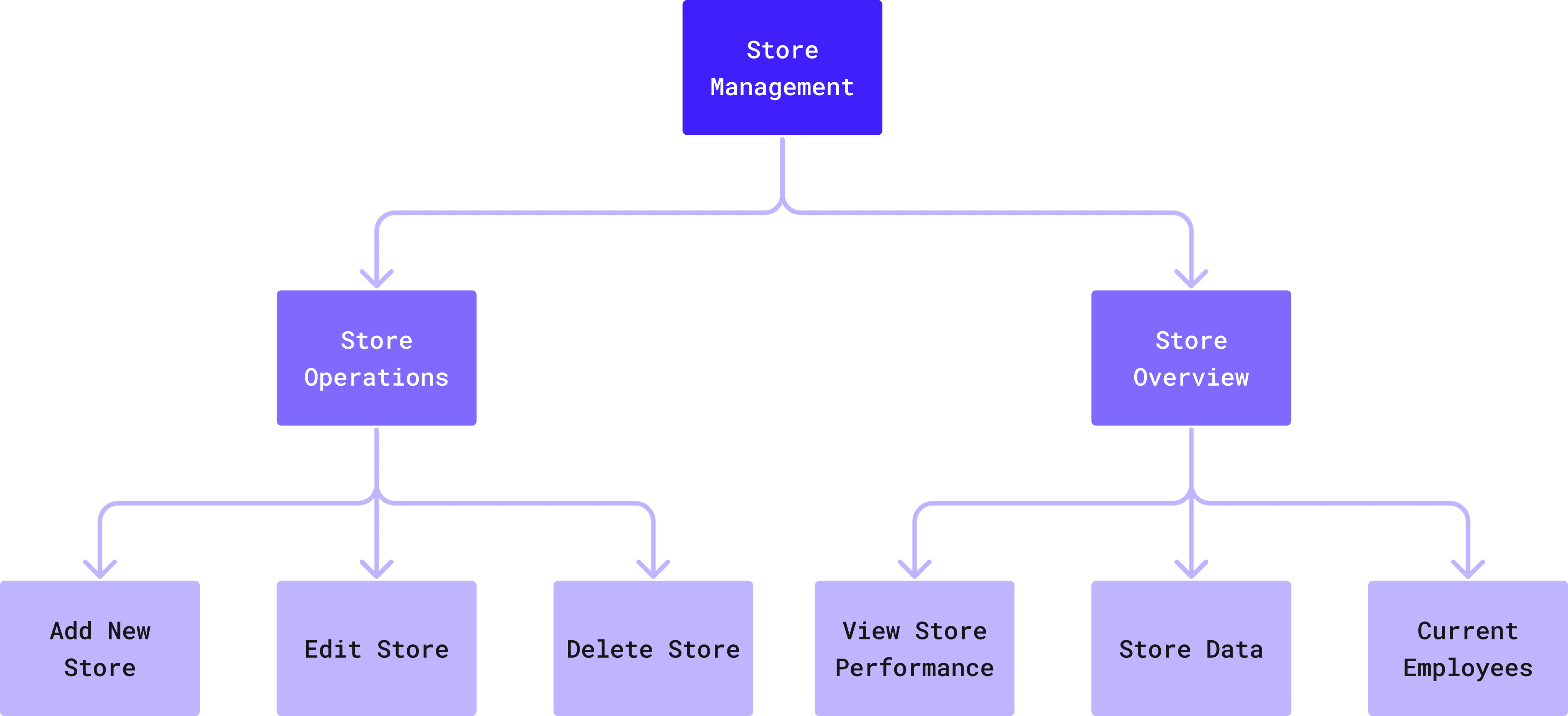
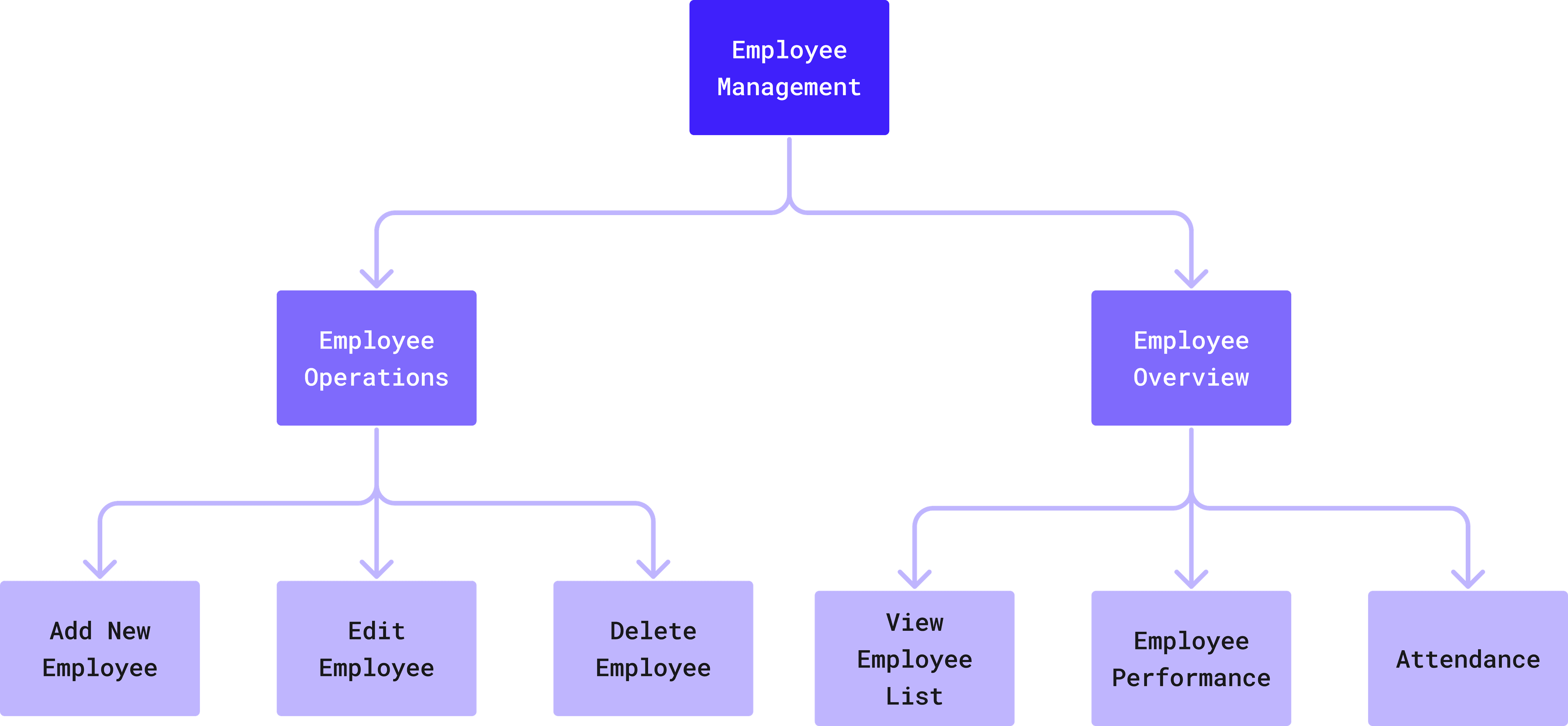
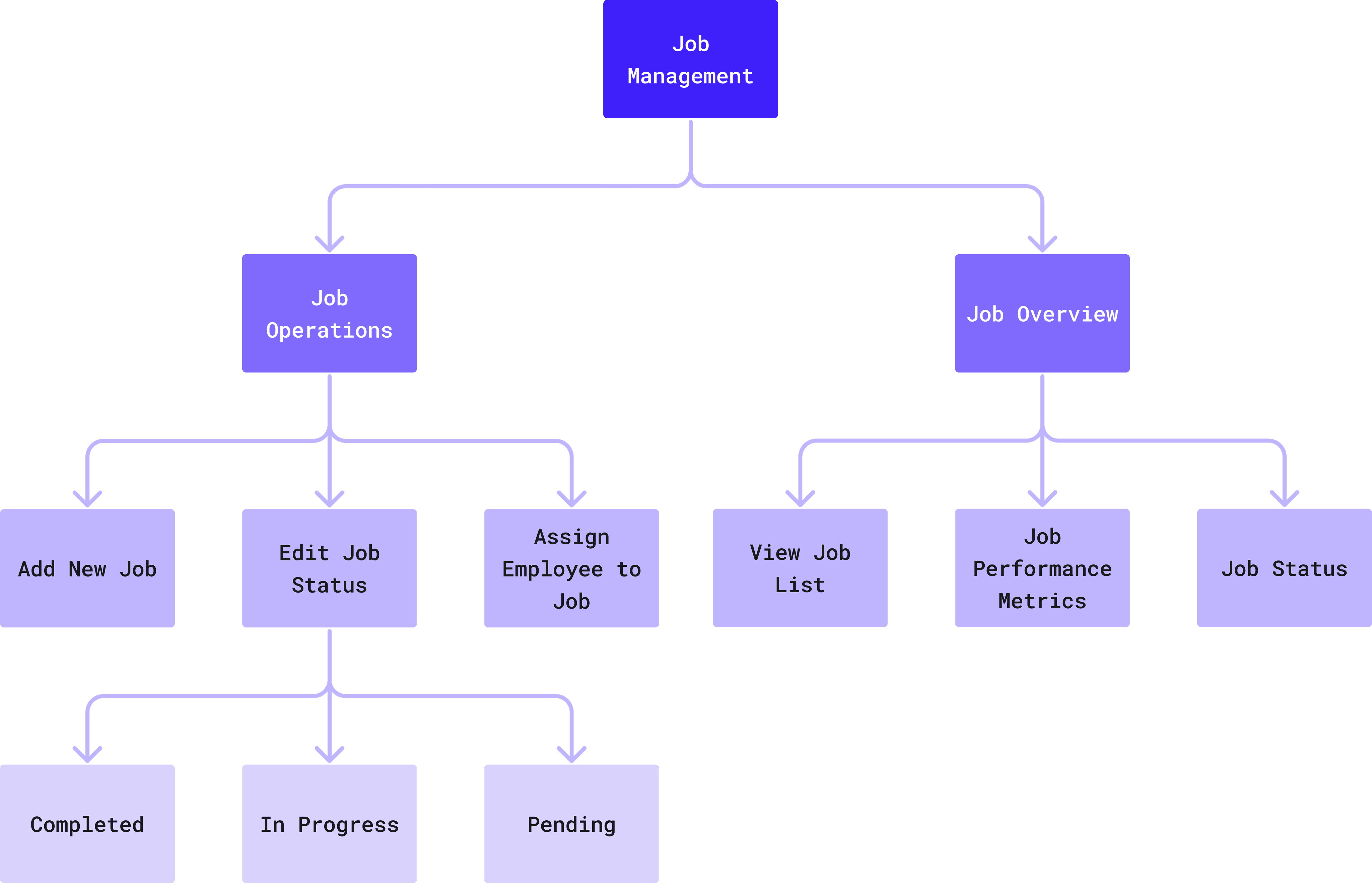
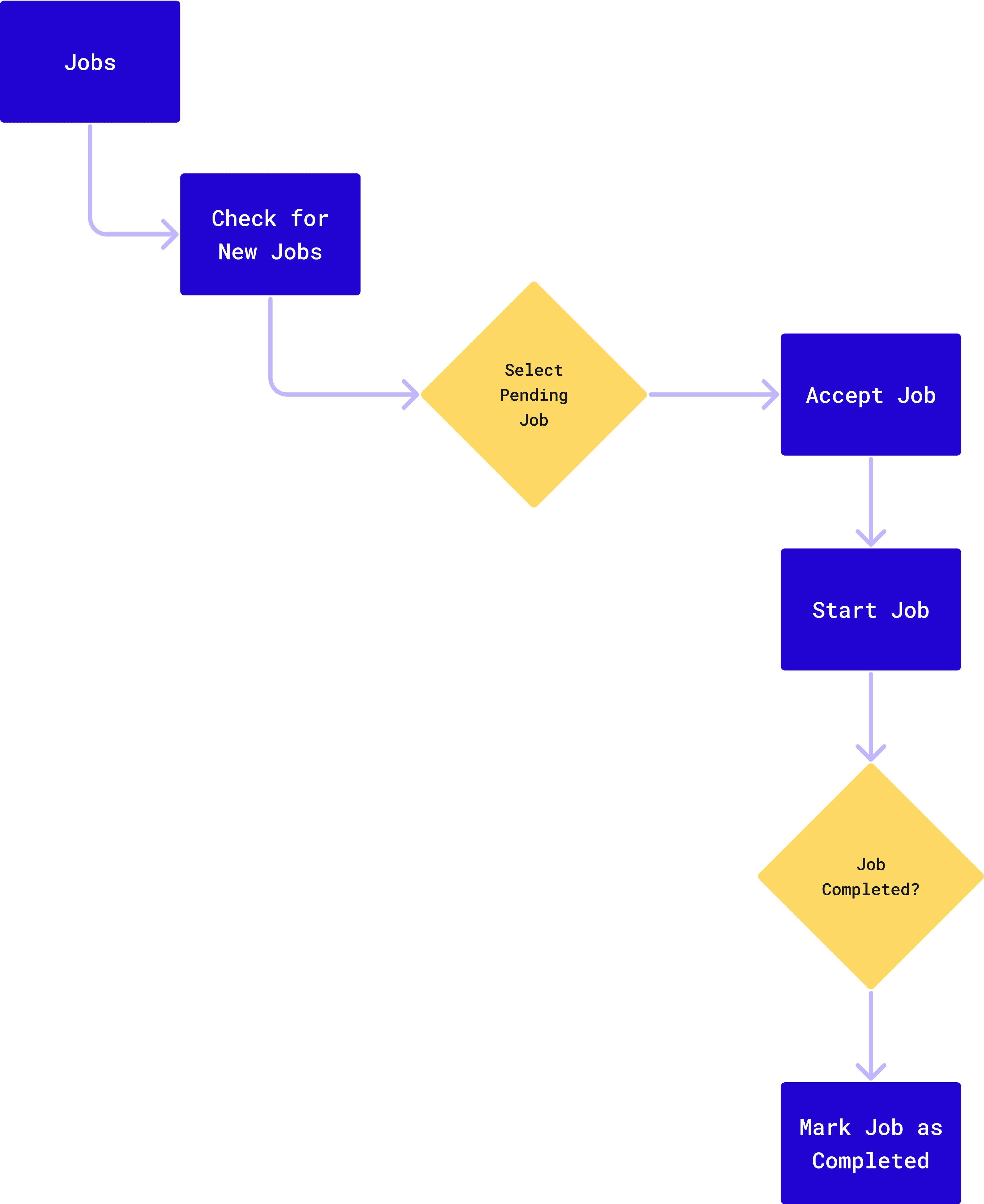
I conducted a brief task flow analysis to ensure that every key user action, whether performed by the Admin or Employee was logical, seamless, and efficient. This step was crucial in breaking down complex processes into manageable workflows, ensuring the platform met the client’s needs for operational simplicity.
Administrator Flow
User (Employee) Flow
Information Architecture
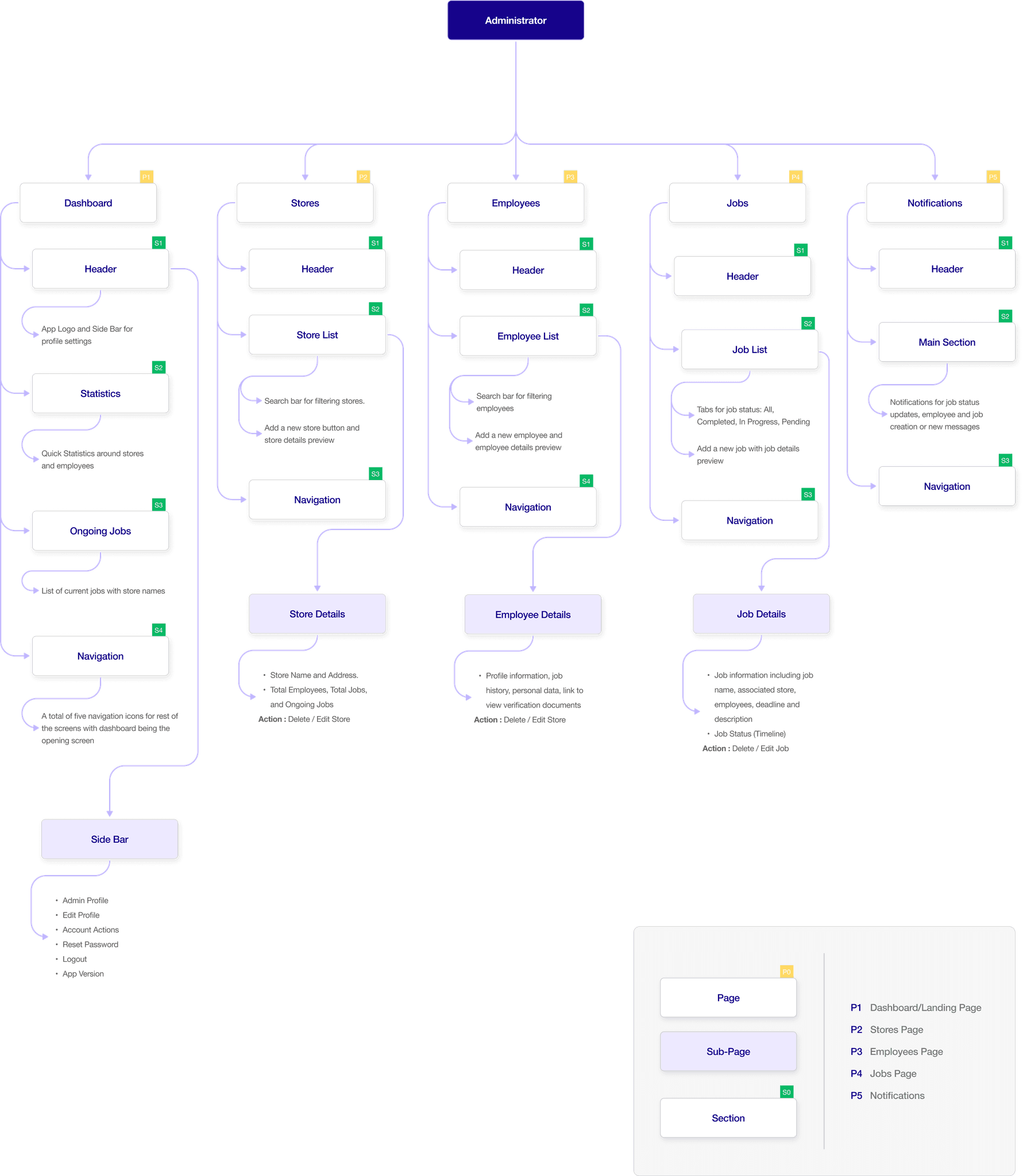
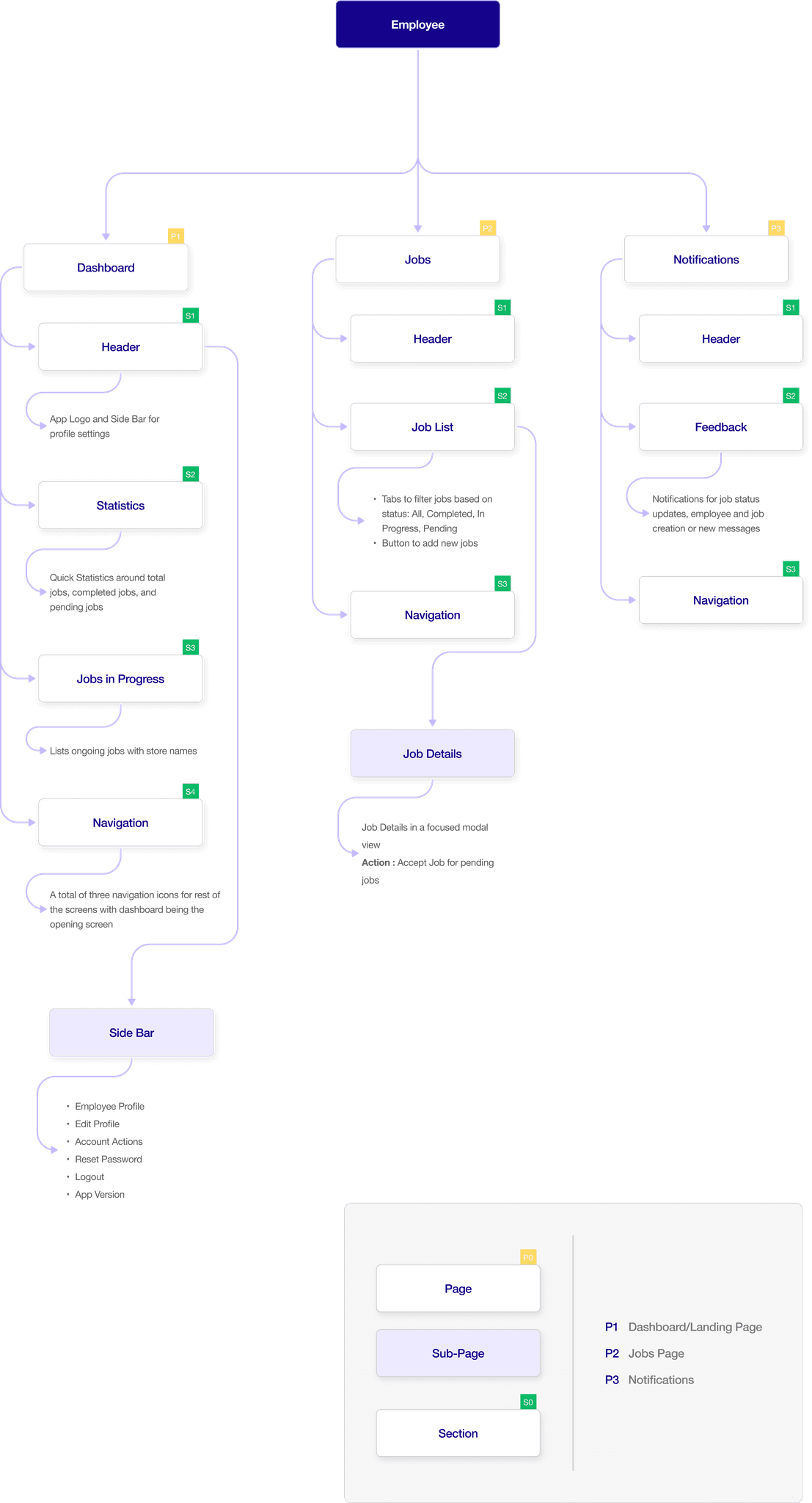
The research and task flow analysis guided the information architecture (IA) for this app. I designed two entry points, one for administrators and one for the employees. Each section—whether it’s the Dashboard, Jobs, Stores, Employees, or Notifications—is structured to display critical information upfront while allowing users to dive deeper into details. I’ve prioritized a user-friendly approach to enhance productivity and reduce complexity for administrators and users interacting with the system.
Design Phase
Testing Early Concepts
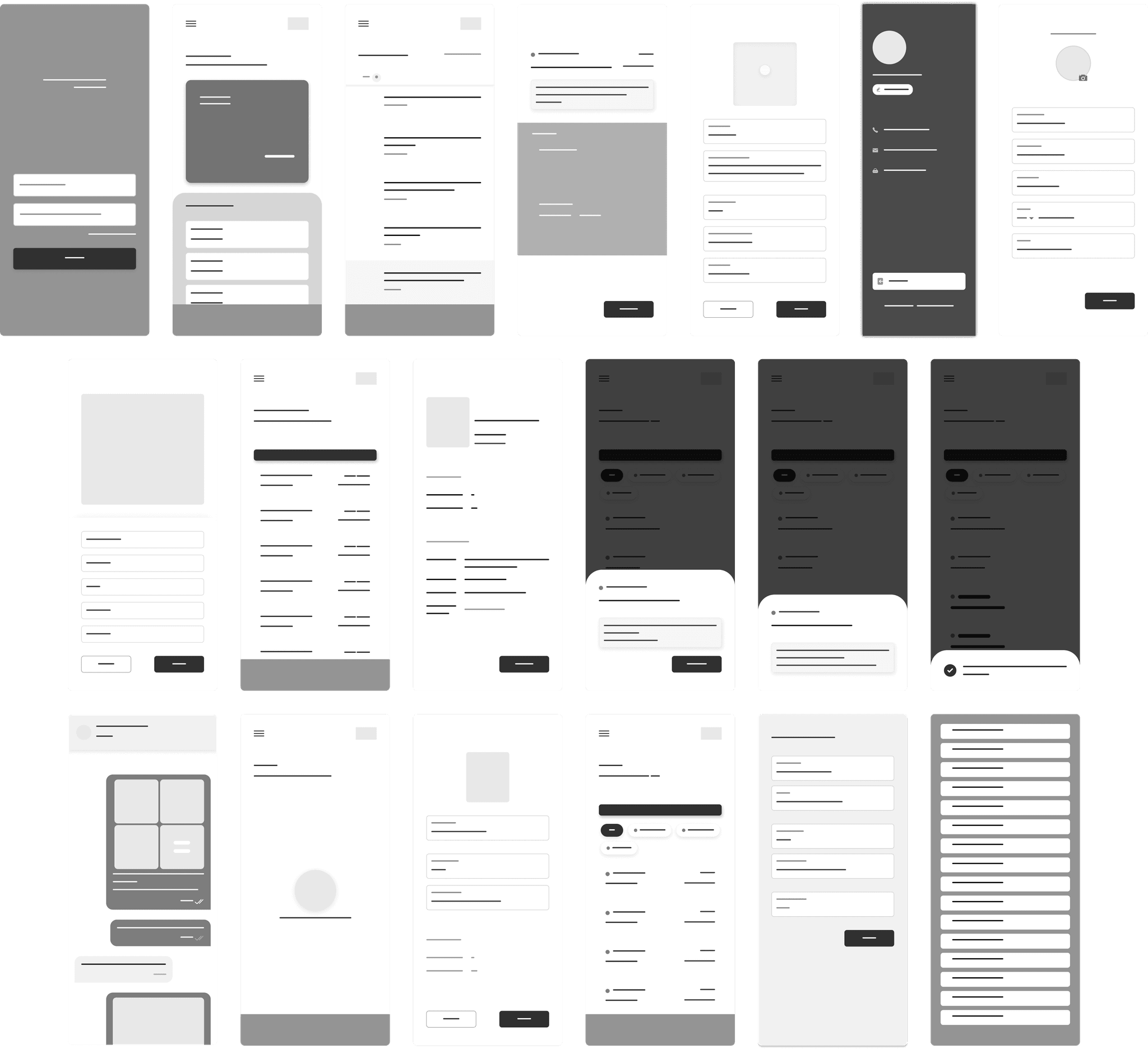
With the IA in place, I tested early conceptual designs with wireframes for Retail Planner 365 that formed the foundation of the application’s user interface. These low-fidelity sketches were focused on functionality, layout, and navigation, aiming to visualize the core structure of the app before moving into detailed design.
Improved Designs with Iterative Feedback
I conducted iterative usability testing sessions with key stakeholders, including administrators and employees who would directly interact with the platform. These sessions provided insights into user behavior, pain points, and expectations, which helped shape the final design. Key changes made based on iterative feedback include:
Streamlined admin and employee panels with clear, intuitive tabs for easy access to primary features
Enabled real-time updates for employee and job data, reducing manual intervention while ensuring accuracy
Improved job timelines with clear stages and timestamps; added direct admin-employee communication via in-job comments
Added options for password resets, profile updates, and in-app notifications for better onboarding and collaboration
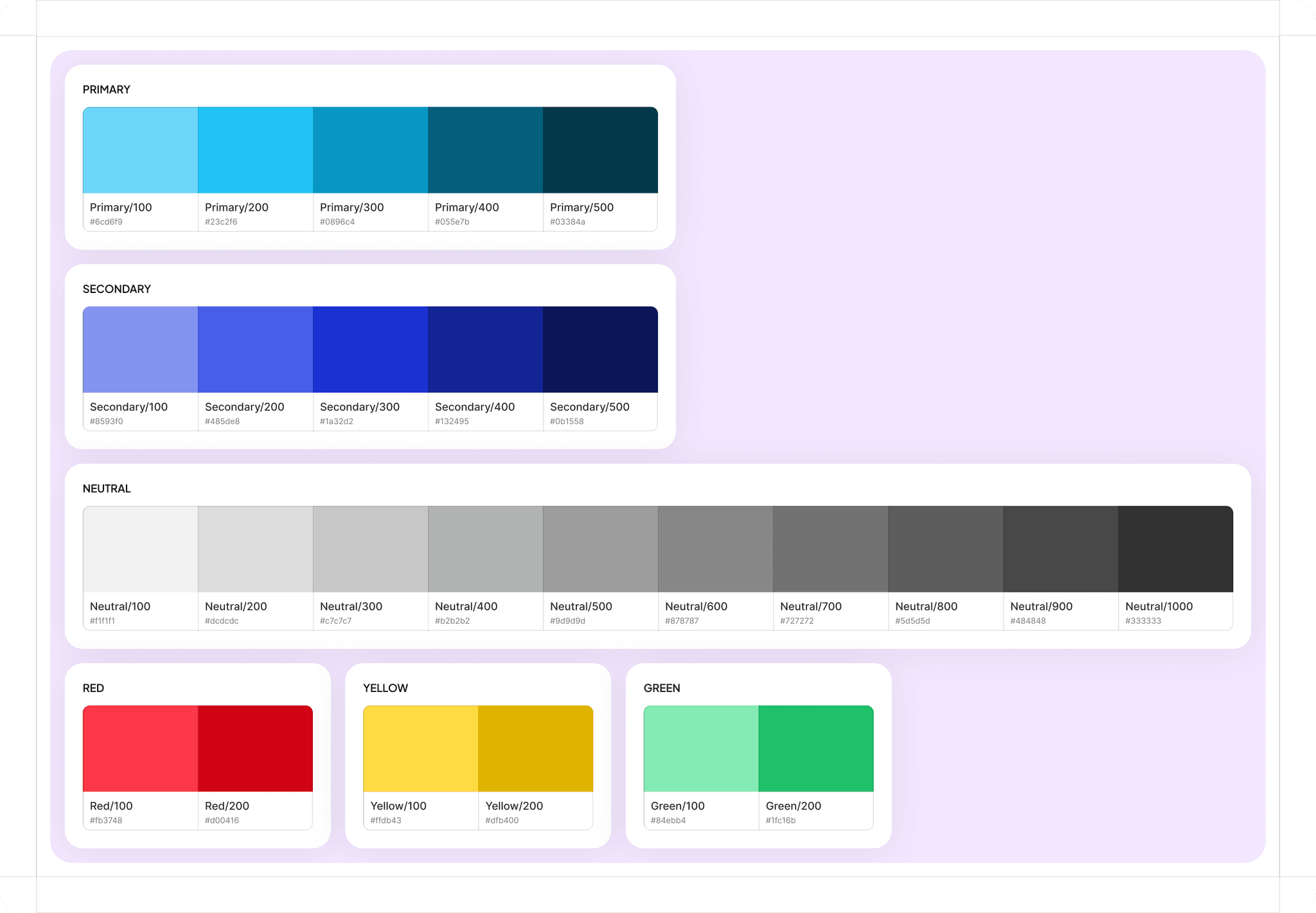
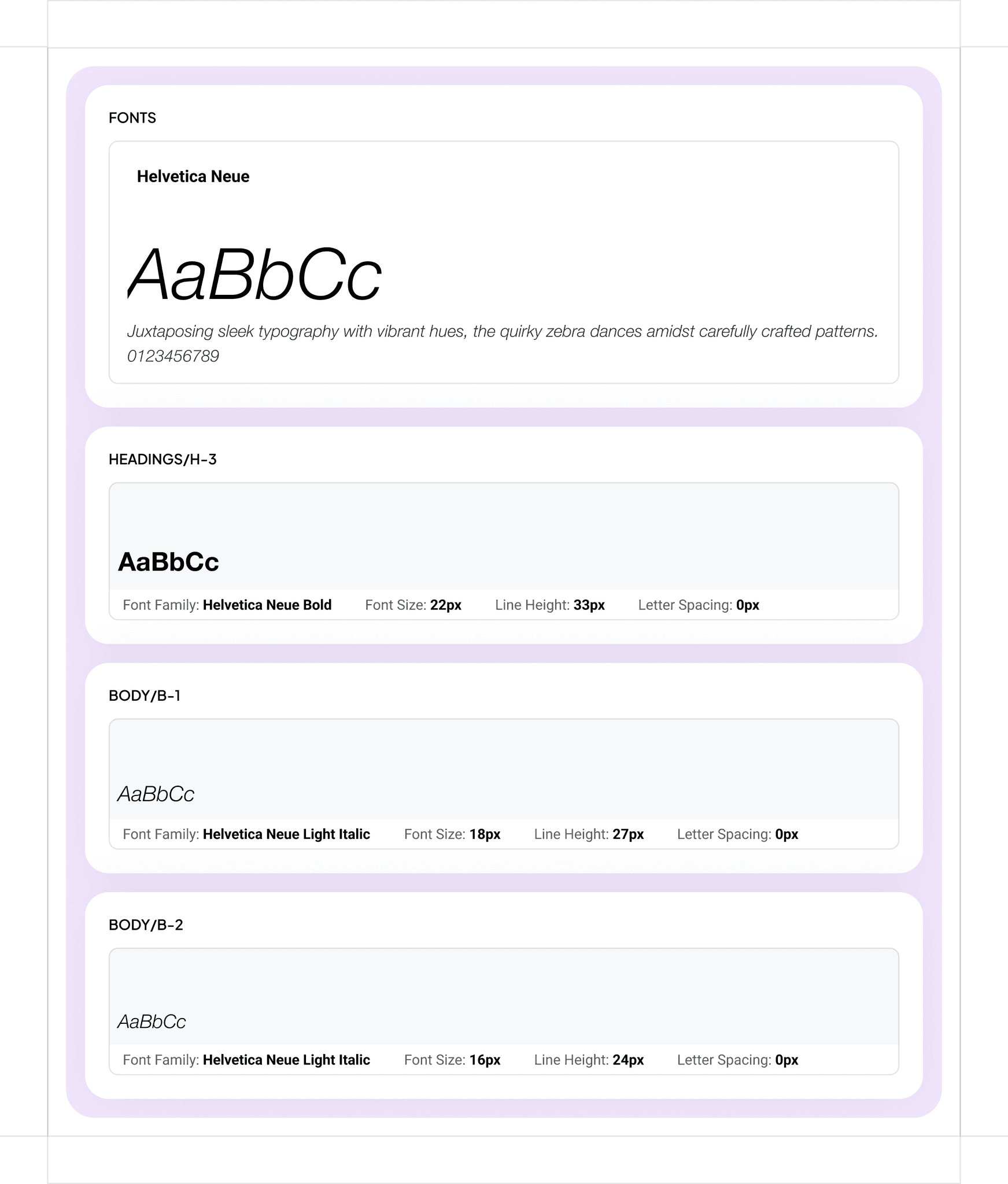
Moving Forward with the Visual Design Palette
With a cohesive color scheme, paired with an accessible typography system, I ensured a seamless user experience while reflecting the brand’s identity. Accent colors like red, yellow, and green were used to denote important actions to enhance quick decision-making.
Final Designs Execution
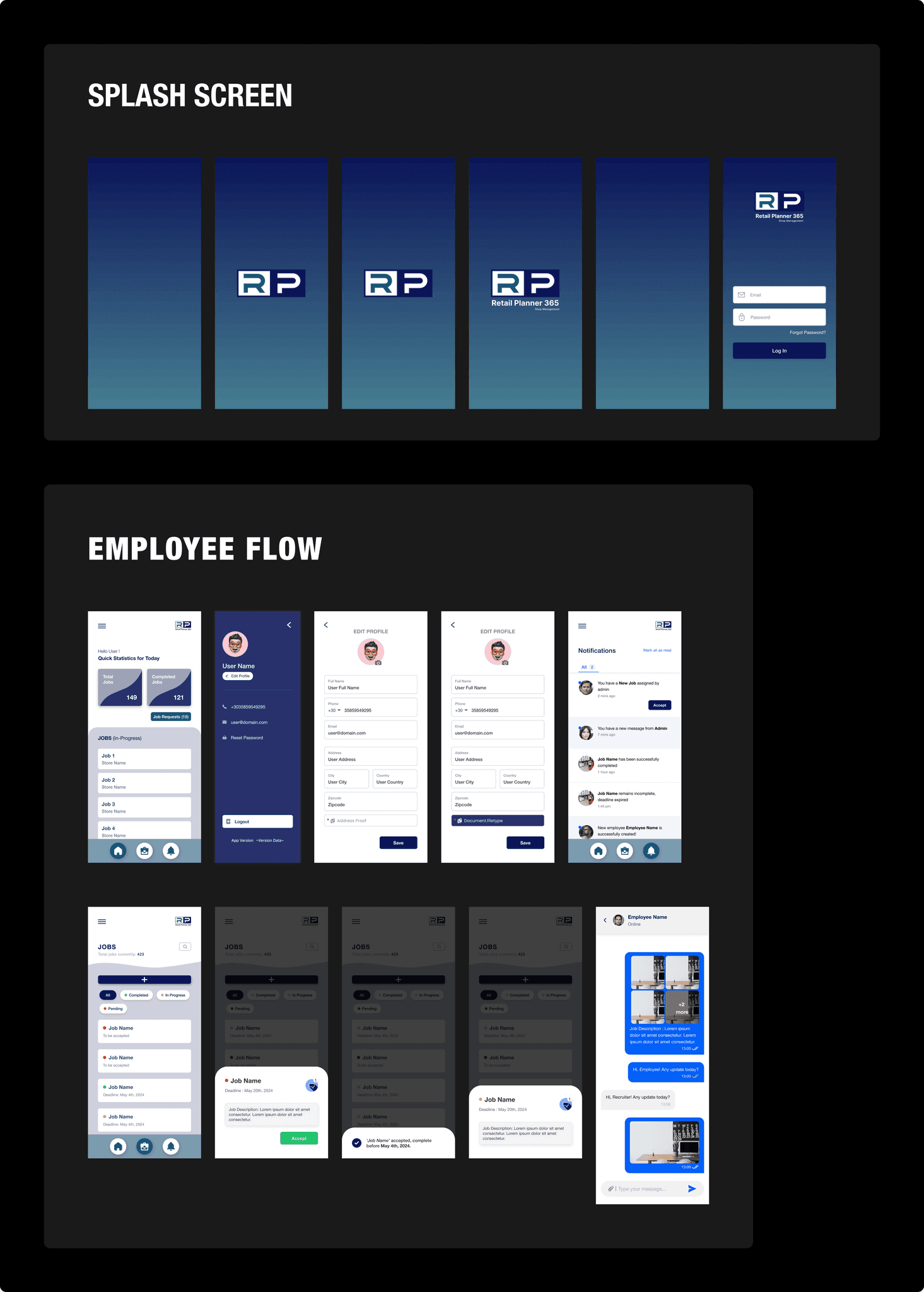
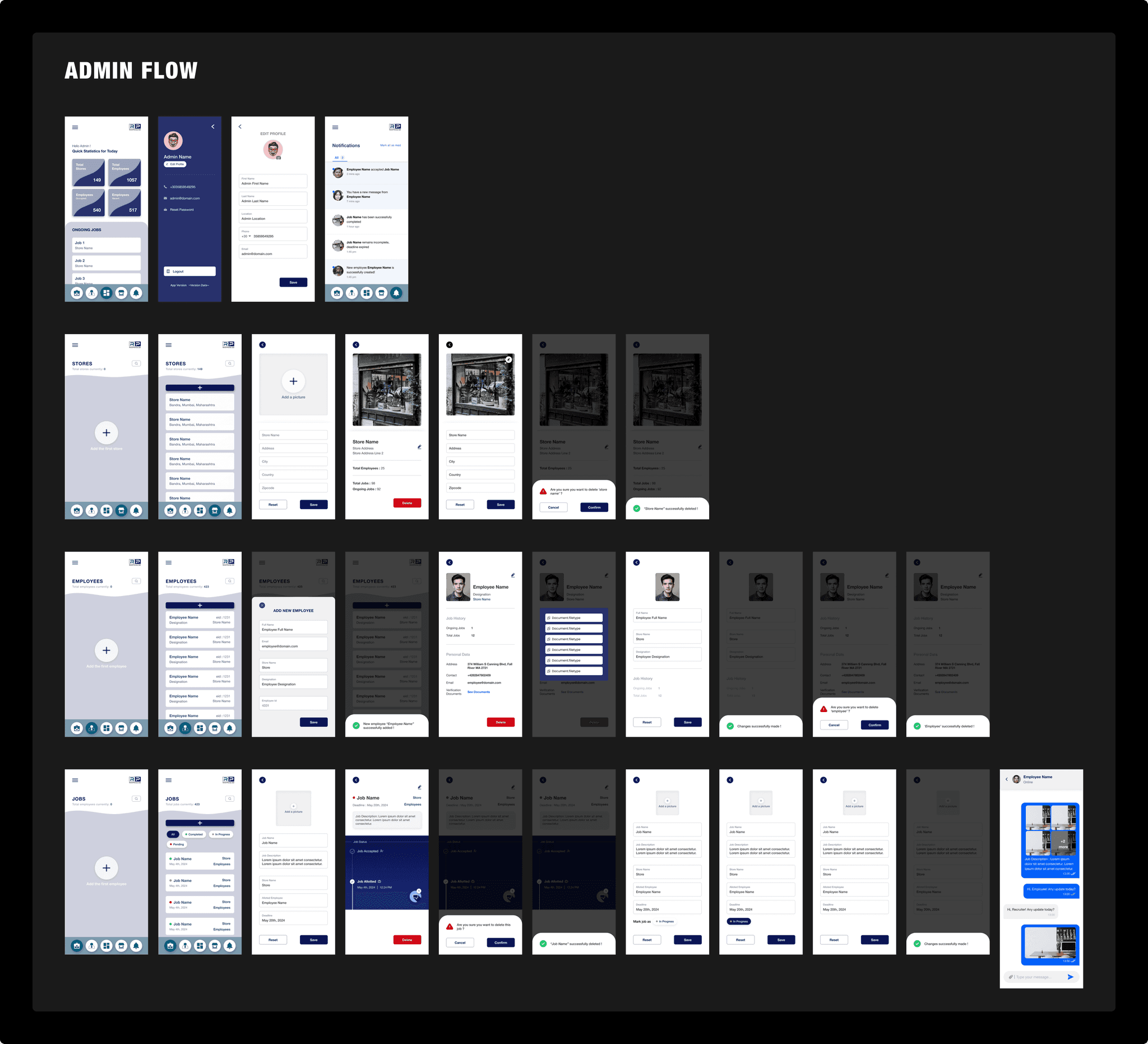
The final wireframes, combined with the visual design palette, laid the foundation for the final designs. During the process, there was considerable discussion about whether to create two separate applications for the employee and the admin. Ultimately, we decided to integrate both flows into a single application. The admin would provide employees with their official credentials, which would then redirect them to the employee-specific flow.
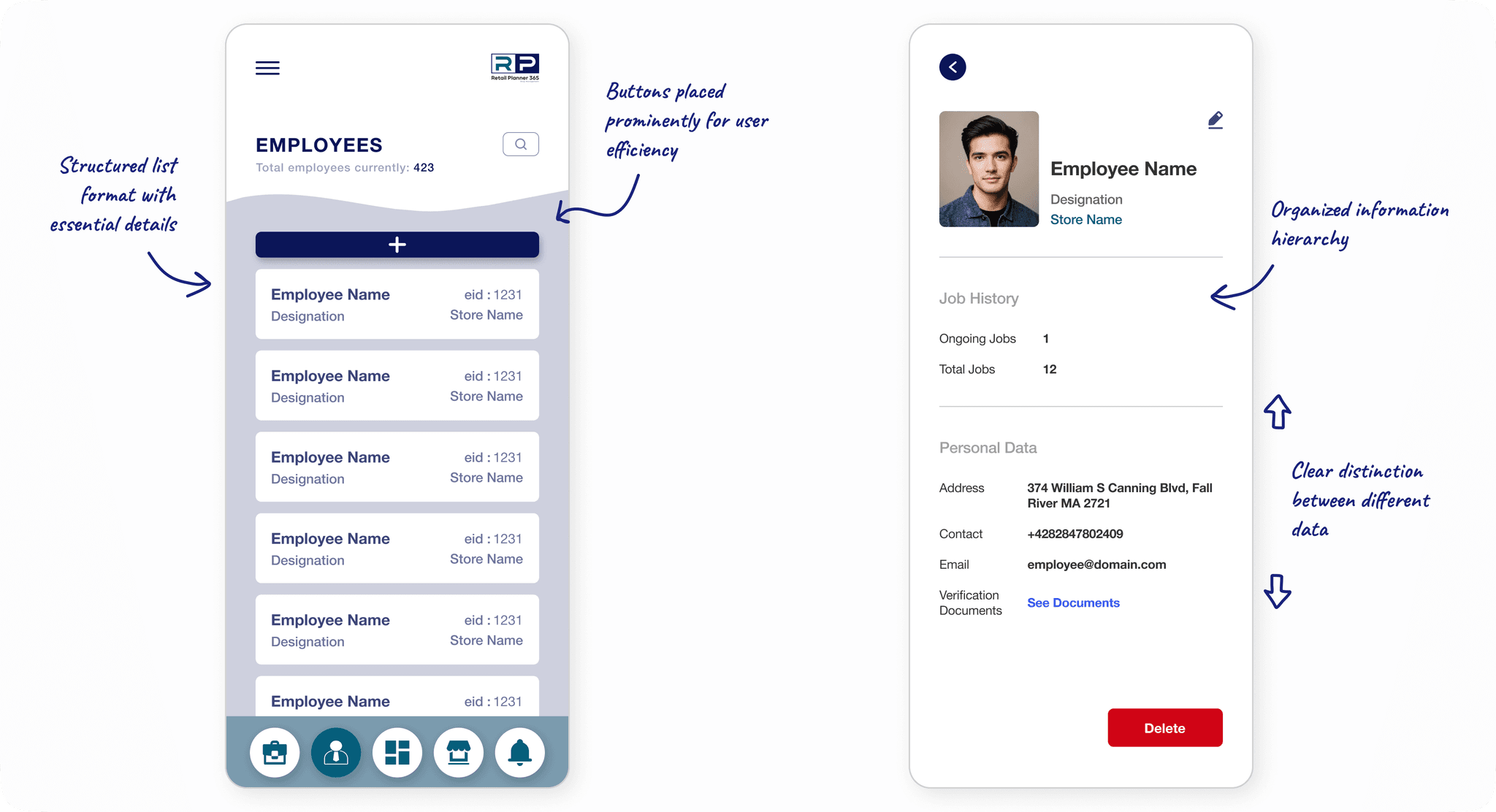
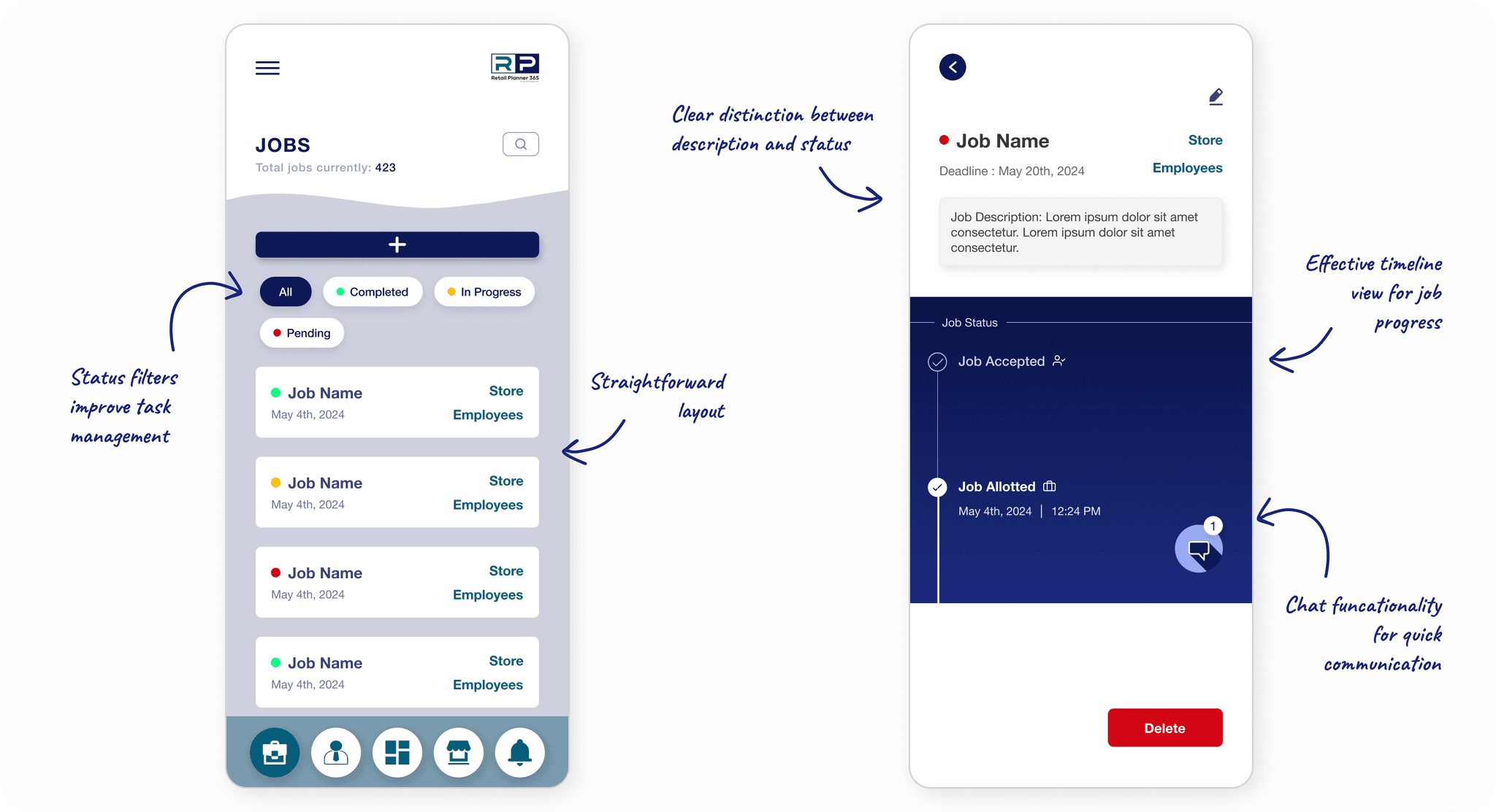
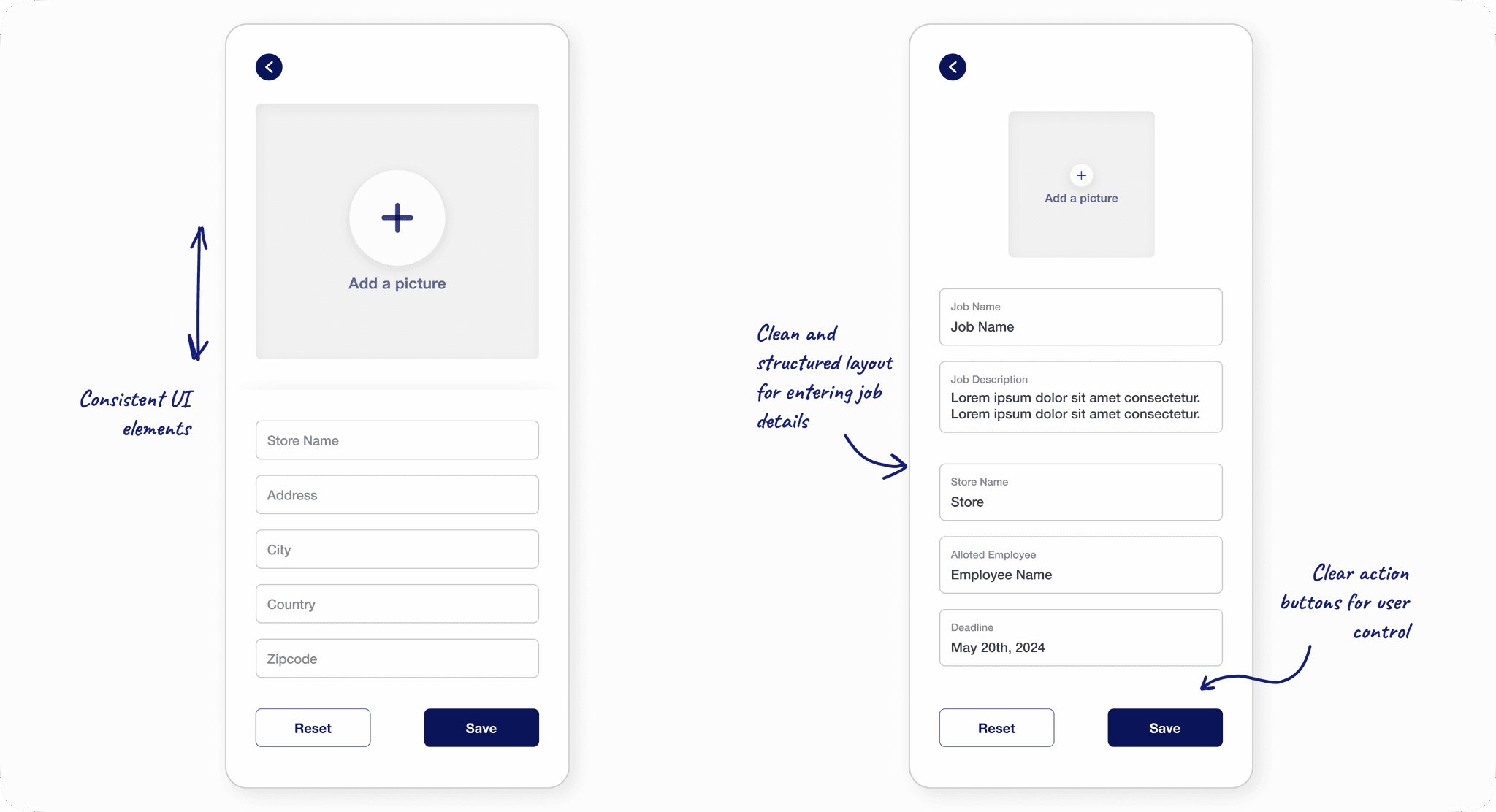
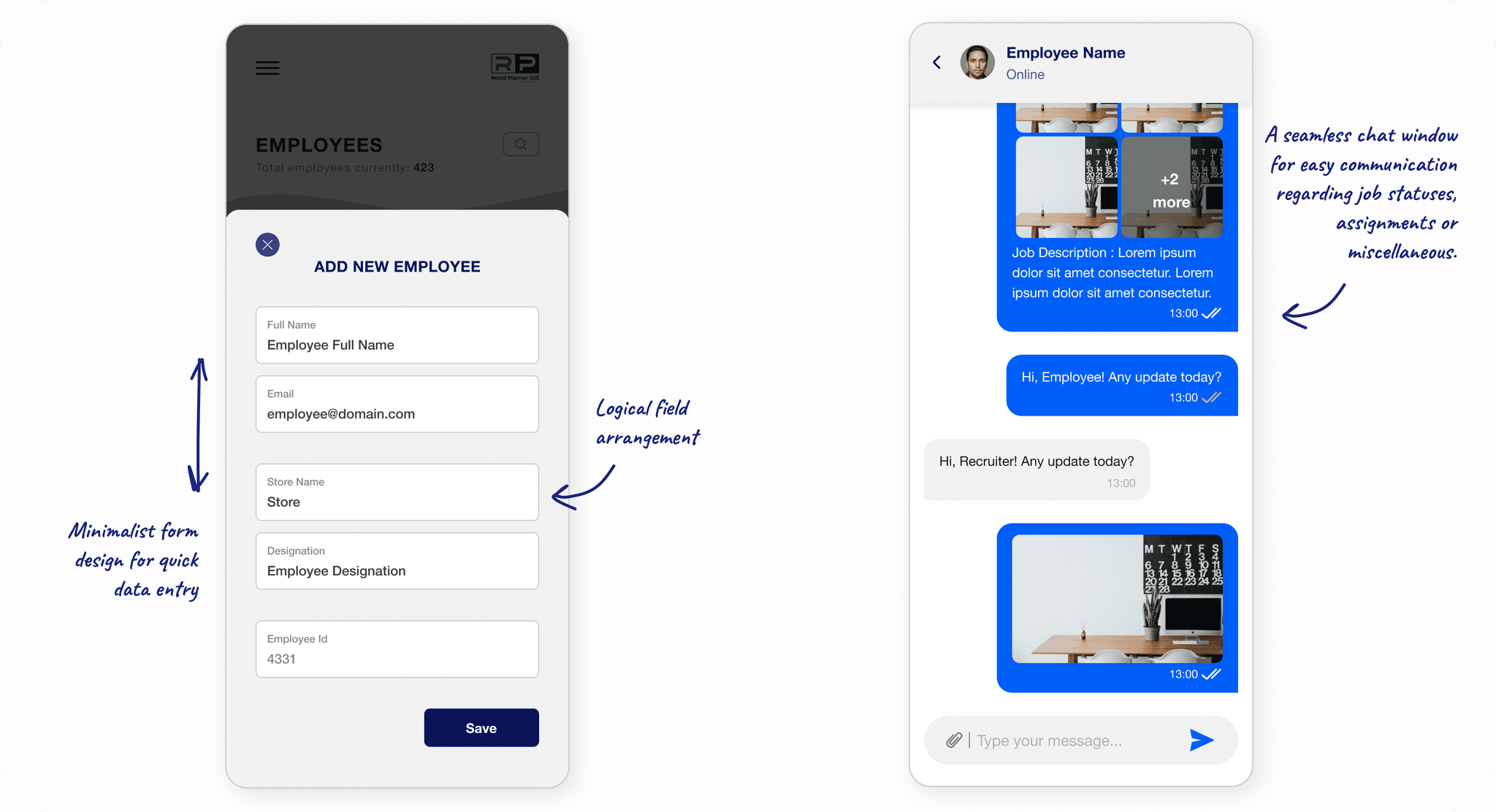
Below are the final designs delivered to the client, shaped by numerous iterations and extensive usability testing:
Retail Planner 365
A retail management app designed to oversee and streamline operations across multiple branches of a store nationwide
Team
1 Stakeholder
2 Developers
1 Tester
1 UX Designer
1 Project Manager
UX Methods
User Research
Ideation
Wireframing
Information Architecture
Visual Design
Interaction Design
My Role
UX Designer
About Retail Planner 365
Retail Planner 365 is an online shop management app designed to streamline operations across multiple branches of a retail store nationwide. Its key features include managing employee data (adding/deleting), assigning employees to specific tasks, overseeing job management, and monitoring job-related statistics. Additionally, it efficiently handles store data for all branches, ensuring seamless coordination and operational efficiency.
Research Phase
The Challenges of Managing Multi-Branch Retail Operations
My client, based in the United Kingdom, sought to enhance operational efficiency across multiple branches of their retail chain. The stores struggled with decentralized data management, resulting in inefficiencies in job assignments and employee oversight. The client needed a centralized, user-friendly platform to unify operations and provide actionable insights for better decision-making.
The following challenges were identified during the initial one-on-one discussions with the client:
Inefficient handling of branch-specific data, leading to duplication and inconsistencies
Lack of a streamlined process to assign tasks to employees, causing delays and confusion
Challenges in tracking employee roles, performance, and allocation across branches
Fragmented operations across branches, resulting in time and resource wastage
Who Are We Designing For?
I conducted comprehensive research to identify primary and secondary users for this app. Upon multiple client meetings and understanding the probable workflow of this app, I defined the target users. These included:
Primary User
Store Managers
NEEDS
Oversee branch-specific tasks.
Easy assignment of tasks and monitoring of employee roles and job progress within their store.
Ability to review job details, including deadlines, comments, and employee feedback.
PAIN POINTS
Confusion around task delegation due to lack of streamlined processes.
Difficulty in maintaining consistent workflows across branches.
Store Employees
NEEDS
Clear visibility of assigned tasks with descriptions, deadlines, and updates.
Ability to accept/reject job requests, track progress, and communicate with admins.
Notifications for assigned jobs, comments, or modifications made by admins.
PAIN POINTS
Ambiguity in task instructions and job timelines.
Lack of a communication channel for clarifying queries.
Delayed feedback on completed tasks.
Secondary User
Administrator
NEEDS
Visibility into operational data, such as total employees, ongoing jobs, and job statuses, to make informed decisions.
Seamless processes for adding, modifying, or deleting stores, employees, and jobs.
PAIN POINTS
Manual and time-consuming updates across multiple branches.
Lack of real-time communication and tracking tools to oversee job progress and employee performance.
User Personas for Better Insights
To create an effective solution, I needed to further understand the people who would use Retail Planner 365 daily. Aligned with the target users of this app, I explored their roles, challenges, and goals by conducting user interviews with some potential users. Based on qualitative analysis and further contextual research, the following personas were developed :
ALEX CARTER
Role : Regional Manager
Age : 38
Alex oversees operations for 10 retail branches across the UK.
"I need a bird’s-eye view of all my stores and their operations. If something’s going wrong, I need to know about it before it’s too late."
Daily Challenges
Spends hours consolidating data from different branches for reports.
Struggles to keep track of job progress and employee performance across multiple stores.
Often finds out about operational issues too late, resulting in delays.
Goals and Needs
A single platform to view all stores, job statuses, and employee details.
Summarized stats like total employees, ongoing jobs, and vacant roles on the dashboard.
Wants to receive instant notifications for key updates, like when an employee accepts a job or misses a deadline.
Ability to assign jobs to specific employees and track their progress.
EMILY DAWSON
Role : Store Employee
Age : 25
Emily works at one of the busiest branches of the retail chain juggling multiple tasks daily.
"I just want to know exactly what needs to be done and when, without having to chase anyone for answers."
Daily Challenges
Misses important updates about her tasks because communication is inconsistent.
Feels frustrated when unclear instructions lead to delays or rework.
Has no easy way to ask questions or clarify job details in real-time.
Goals and Needs
A system that shows all assigned tasks with deadlines and priority levels.
Wants a built-in chat or comment feature to quickly clarify questions with her manager.
Needs to know which tasks are pending, in progress, or completed at a glance.
Alerts when a new task is assigned or a deadline is approaching.
Information Architecture
The research and task flow analysis guided the information architecture (IA) for this app. I designed two entry points, one for administrators and one for the employees. Each section—whether it’s the Dashboard, Jobs, Stores, Employees, or Notifications—is structured to display critical information upfront while allowing users to dive deeper into details. I’ve prioritized a user-friendly approach to enhance productivity and reduce complexity for administrators and users interacting with the system.
Design Phase
Testing Early Concepts
With the IA in place, I tested early conceptual designs with wireframes for Retail Planner 365 that formed the foundation of the application’s user interface. These low-fidelity sketches were focused on functionality, layout, and navigation, aiming to visualize the core structure of the app before moving into detailed design.
Improved Designs with Iterative Feedback
I conducted iterative usability testing sessions with key stakeholders, including administrators and employees who would directly interact with the platform. These sessions provided insights into user behavior, pain points, and expectations, which helped shape the final design. Key changes made based on iterative feedback include:
Streamlined admin and employee panels with clear, intuitive tabs for easy access to primary features
Enabled real-time updates for employee and job data, reducing manual intervention while ensuring accuracy
Improved job timelines with clear stages and timestamps; added direct admin-employee communication via in-job comments
Added options for password resets, profile updates, and in-app notifications for better onboarding and collaboration
Moving Forward with the Visual Design Palette
With a cohesive color scheme, paired with an accessible typography system, I ensured a seamless user experience while reflecting the brand’s identity. Accent colors like red, yellow, and green were used to denote important actions to enhance quick decision-making.
Final Designs Execution
The final wireframes, combined with the visual design palette, laid the foundation for the final designs. During the process, there was considerable discussion about whether to create two separate applications for the employee and the admin. Ultimately, we decided to integrate both flows into a single application. The admin would provide employees with their official credentials, which would then redirect them to the employee-specific flow.
Below are the final designs delivered to the client, shaped by numerous iterations and extensive usability testing:
Administrator Flow
User (Employee) Flow
Ideation Phase
Breaking Down the Process with Task Flow Analysis
I conducted a brief task flow analysis to ensure that every key user action, whether performed by the Admin or Employee was logical, seamless, and efficient. This step was crucial in breaking down complex processes into manageable workflows, ensuring the platform met the client’s needs for operational simplicity.
Retail Planner 365
A retail management app designed to oversee and streamline operations across multiple branches of a store nationwide
My Role
UX Designer
Team
1 Stakeholder
2 Developers
1 Tester
1 UX Designer
1 Project Manager
UX Methods
User Research
Ideation
Wireframing
Information Architecture
Visual Design
Interaction Design
About Retail Planner 365
Retail Planner 365 is an online shop management app designed to streamline operations across multiple branches of a retail store nationwide. Its key features include managing employee data (adding/deleting), assigning employees to specific tasks, overseeing job management, and monitoring job-related statistics. Additionally, it efficiently handles store data for all branches, ensuring seamless coordination and operational efficiency.
The Challenges of Managing Multi-Branch Retail Operations
Research Phase
My client, based in the United Kingdom, sought to enhance operational efficiency across multiple branches of their retail chain. The stores struggled with decentralized data management, resulting in inefficiencies in job assignments and employee oversight. The client needed a centralized, user-friendly platform to unify operations and provide actionable insights for better decision-making.
The following challenges were identified during the initial one-on-one discussions with the client:
Inefficient handling of branch-specific data, leading to duplication and inconsistencies
Lack of a streamlined process to assign tasks to employees, causing delays and confusion
Challenges in tracking employee roles, performance, and allocation across branches
Fragmented operations across branches, resulting in time and resource wastage
Who Are We Designing For?
To address the client’s challenges effectively, I conducted comprehensive research to identify primary and secondary users for this app. Upon multiple client meetings and understanding the probable workflow of this app, I defined the target users. These included:
Primary User
Store Managers
NEEDS
Oversee branch-specific tasks.
Easy assignment of tasks and monitoring of employee roles and job progress within their store.
Ability to review job details, including deadlines, comments, and employee feedback.
PAIN POINTS
Confusion around task delegation due to lack of streamlined processes.
Difficulty in maintaining consistent workflows across branches.
Store Employees
NEEDS
Clear visibility of assigned tasks with descriptions, deadlines, and updates.
Ability to accept/reject job requests, track progress, and communicate with admins.
Notifications for assigned jobs, comments, or modifications made by admins.
PAIN POINTS
Ambiguity in task instructions and job timelines.
Lack of a communication channel for clarifying queries.
Delayed feedback on completed tasks.
Secondary User
Administrator
NEEDS
Visibility into operational data, such as total employees, ongoing jobs, and job statuses, to make informed decisions.
Seamless processes for adding, modifying, or deleting stores, employees, and jobs.
PAIN POINTS
Manual and time-consuming updates across multiple branches.
Lack of real-time communication and tracking tools to oversee job progress and employee performance.
User Personas for Better Insights
To create an effective solution, I needed to further understand the people who would use Retail Planner 365 daily. Aligned with the target users of this app, I explored their roles, challenges, and goals by conducting user interviews with some potential users. Based on the qualitative feedback received and further contextual research, the following personas were developed :
ALEX CARTER
Role : Regional Manager
Age : 38
Alex oversees operations for 10 retail branches across the UK.
"I need a bird’s-eye view of all my stores and their operations. If something’s going wrong, I need to know about it before it’s too late."
Daily Challenges
Spends hours consolidating data from different branches for reports.
Struggles to keep track of job progress and employee performance across multiple stores.
Often finds out about operational issues too late, resulting in delays.
Goals and Needs
A single platform to view all stores, job statuses, and employee details.
Summarized stats like total employees, ongoing jobs, and vacant roles on the dashboard.
Wants to receive instant notifications for key updates, like when an employee accepts a job or misses a deadline.
Ability to assign jobs to specific employees and track their progress.
EMILY DAWSON
Role : Store Employee
Age : 25
Emily works at one of the busiest branches of the retail chain juggling multiple tasks daily.
"I just want to know exactly what needs to be done and when, without having to chase anyone for answers."
Daily Challenges
Misses important updates about her tasks because communication is inconsistent.
Feels frustrated when unclear instructions lead to delays or rework.
Has no easy way to ask questions or clarify job details in real-time.
Goals and Needs
A system that shows all assigned tasks with deadlines and priority levels.
Wants a built-in chat or comment feature to quickly clarify questions with her manager.
Needs to know which tasks are pending, in progress, or completed at a glance.
Alerts when a new task is assigned or a deadline is approaching.
I conducted a brief task flow analysis to ensure that every key user action, whether performed by the Admin or Employee was logical, seamless, and efficient. This step was crucial in breaking down complex processes into manageable workflows, ensuring the platform met the client’s needs for operational simplicity.
Ideation Phase
Breaking Down the Process with Task Flow Analysis
Administrator Flow
User (Employee) Flow
Information Architecture
The research and task flow analysis guided the information architecture (IA) for this app. I designed two entry points, one for administrators and one for the employees. Each section—whether it’s the Dashboard, Jobs, Stores, Employees, or Notifications—is structured to display critical information upfront while allowing users to dive deeper into details. I’ve prioritized a user-friendly approach to enhance productivity and reduce complexity for administrators and users interacting with the system.
With the IA in place, I tested early conceptual designs with wireframes for Retail Planner 365 that formed the foundation of the application’s user interface. These low-fidelity sketches were focused on functionality, layout, and navigation, aiming to visualize the core structure of the app before moving into detailed design.
Design Phase
Testing Early Concepts
Improved Designs with Iterative Feedback
I conducted iterative usability testing sessions with key stakeholders, including administrators and employees who would directly interact with the platform. These sessions provided insights into user behavior, pain points, and expectations, which helped shape the final design. Key changes made based on iterative feedback include:
Streamlined admin and employee panels with clear, intuitive tabs for easy access to primary features
Enabled real-time updates for employee and job data, reducing manual intervention while ensuring accuracy
Improved job timelines with clear stages and timestamps; added direct admin-employee communication via in-job comments
Added options for password resets, profile updates, and in-app notifications for better onboarding and collaboration
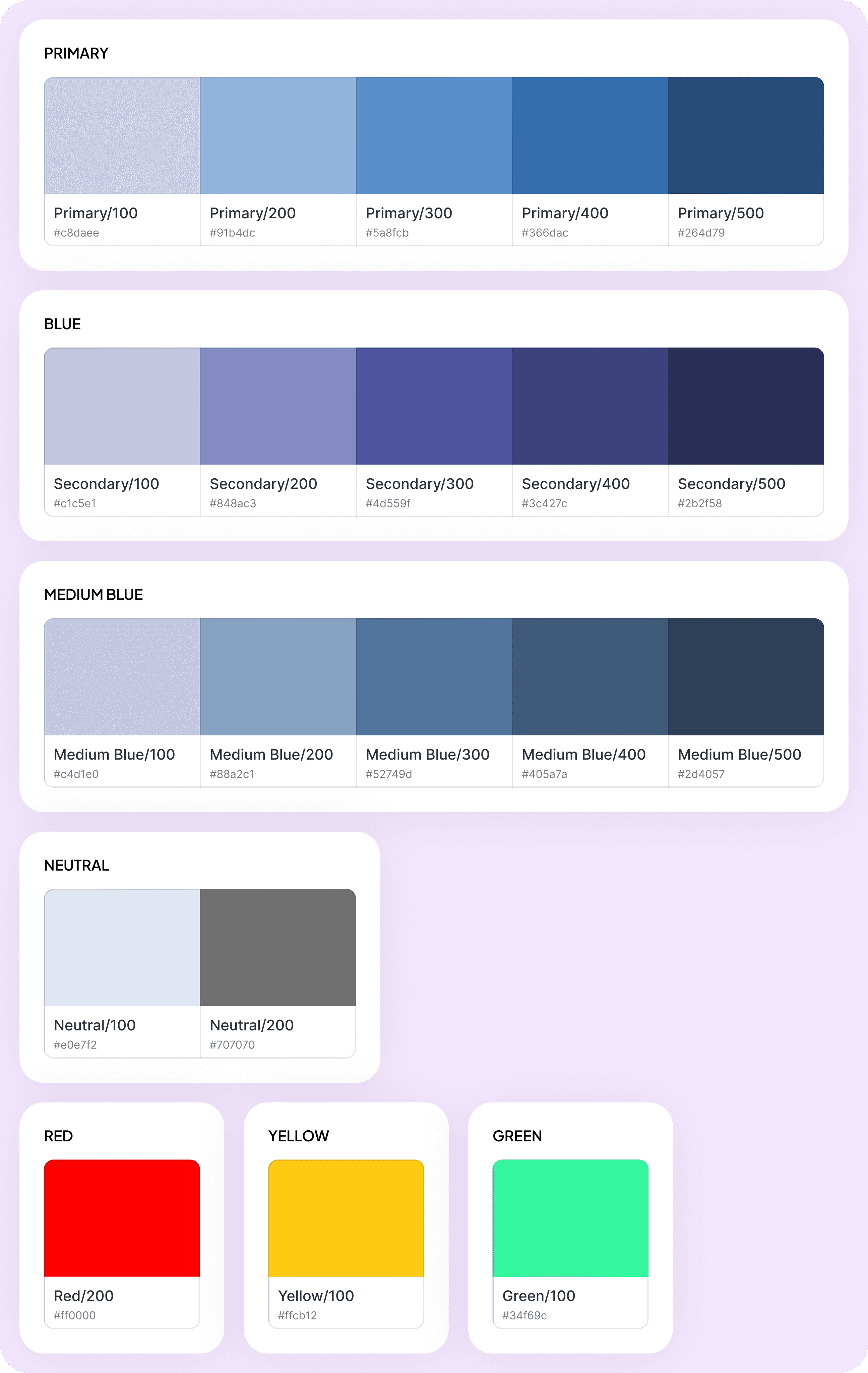
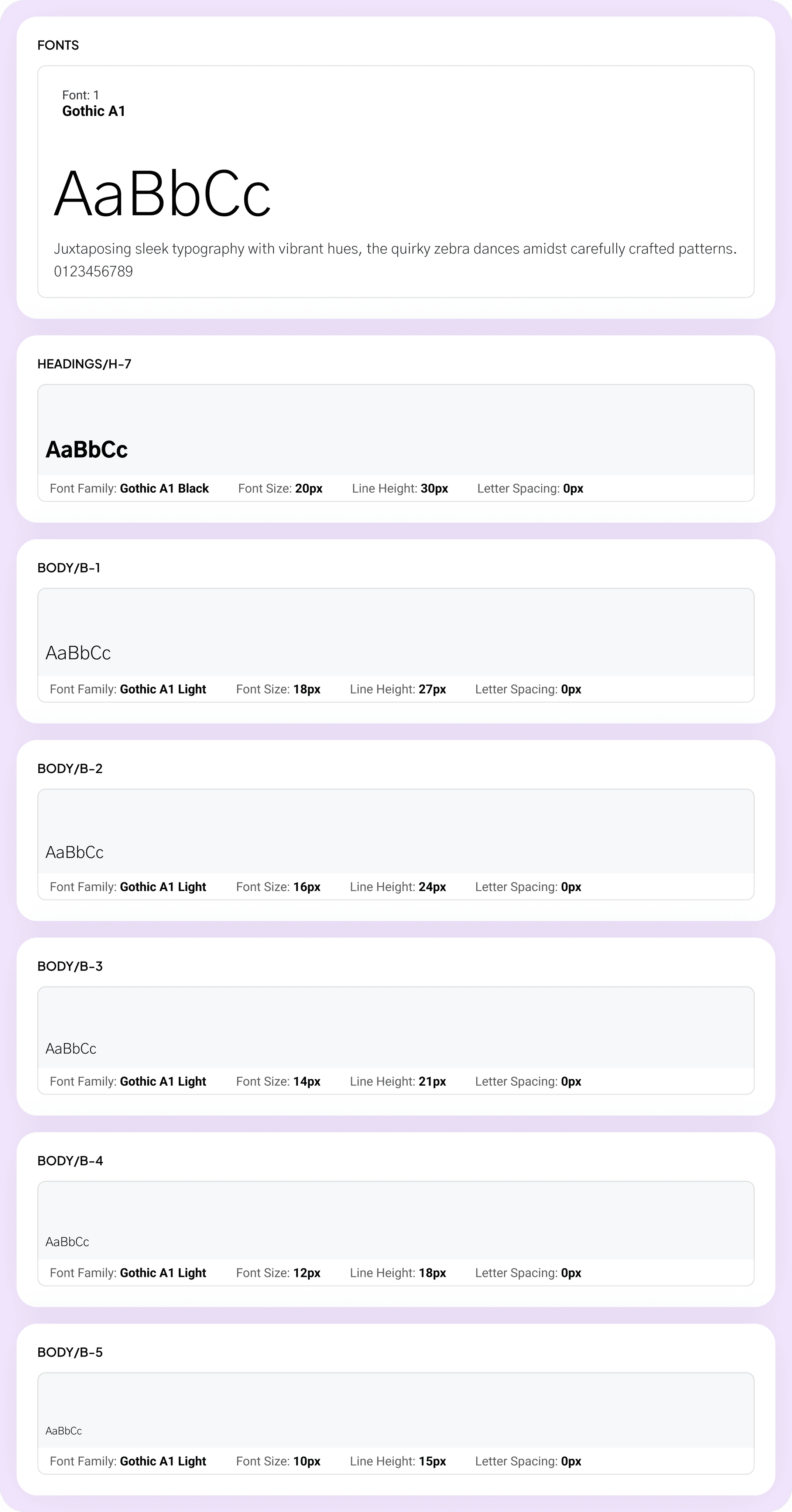
Moving Forward with the Visual Design Palette
With a cohesive color scheme, paired with an accessible typography system, I ensured a seamless user experience while reflecting the brand’s identity. Accent colors like red, yellow, and green were used to denote important actions to enhance quick decision-making.
Final Designs Execution
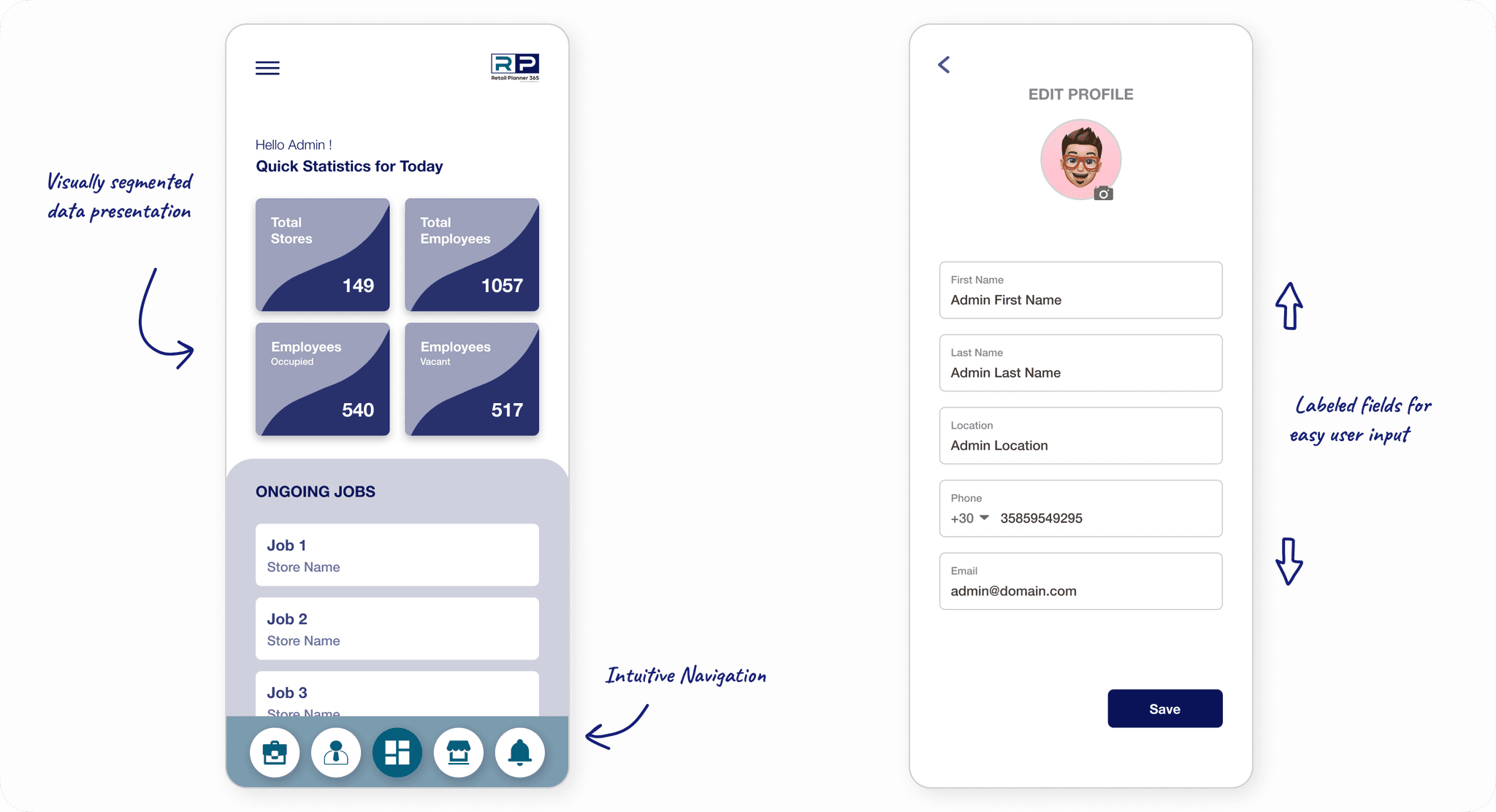
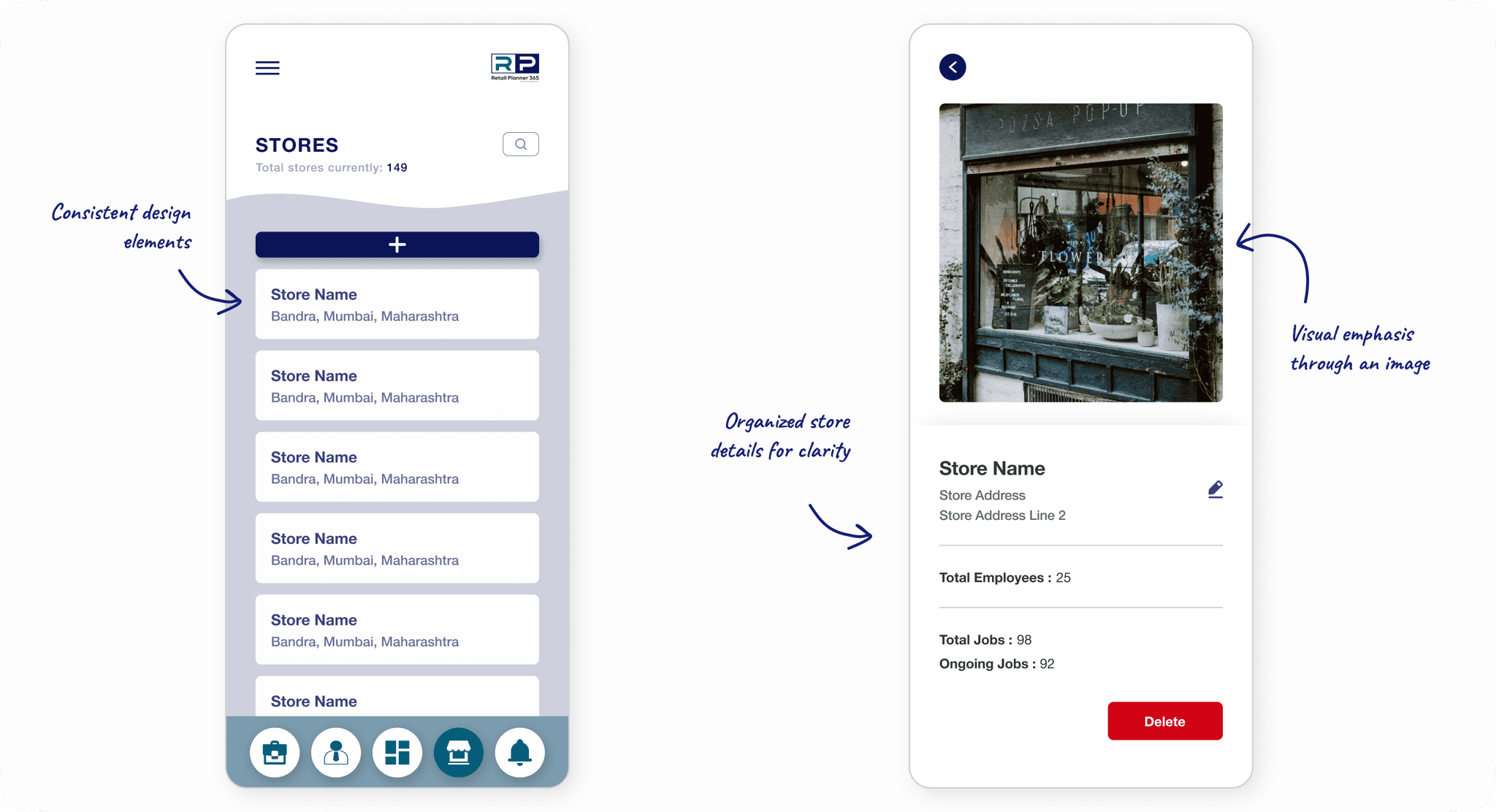
The final wireframes, combined with the visual design palette, laid the foundation for the final designs. During the process, there was considerable discussion about whether to create two separate applications for the employee and the admin. Ultimately, we decided to integrate both flows into a single application. The admin would provide employees with their official credentials, which would then redirect them to the employee-specific flow.
Below are the final designs delivered to the client, shaped by numerous iterations and extensive usability testing:
Retail Planner 365 : Key Features for Retail Efficiency
Retail Planner 365 : Key Features for Retail Efficiency
Project Wrap-Up
What Did We Achieve?
With the final designs we managed to significantly improve the overall administration of multi-branch retail chain. The pain points expressed in the research phase were duely addressed resulting in an efficient management across branches.
Measuring the Impact
By engaging with employees and managers across 10+ retail branches, we streamlined operations and tailored the app to their workflows.
During the final usability testing phase, the app achieved an 85% task success rate, underscoring its effectiveness in addressing user needs.
The employee and manager panels designed led to a 40% increase in overall efficiency in workflow.
What I Could Do with More Time
More personalized features for employees and managers, such as customizable dashboards and role-specific shortcuts.
Advanced analytics tools to provide managers with deeper insights into operational performance.
Scalablity testing to ensure the app could seamlessly support a growing number of branches and users.
Gamification elements, such as achievement tracking or task completion rewards, to boost user motivation and engagement.
Project Wrap-Up
Project Wrap-Up
What Did We Achieve?
With the final designs we managed to significantly improve the overall administration of multi-branch retail chain. The pain points expressed in the research phase were duely addressed resulting in an efficient management across branches.
Measuring the Impact
By engaging with employees and managers across 10+ retail branches, we streamlined operations and tailored the app to their workflows.
During the final usability testing phase, the app achieved an 85% task success rate, underscoring its effectiveness in addressing user needs.
The employee and manager panels designed led to a 40% increase in overall efficiency in workflow.
What I Could Do with More Time
More personalized features for employees and managers, such as customizable dashboards and role-specific shortcuts.
Advanced analytics tools to provide managers with deeper insights into operational performance.
Scalablity testing to ensure the app could seamlessly support a growing number of branches and users.
Gamification elements, such as achievement tracking or task completion rewards, to boost user motivation and engagement.
With the final designs we managed to significantly improve the overall administration of multi-branch retail chain. The pain points expressed in the research phase were duely addressed resulting in an efficient management across branches.
Project Wrap-Up
What Did We Achieve?
Measuring the Impact
During the final usability testing phase, the app achieved an 85% task success rate, underscoring its effectiveness in addressing user needs.
By engaging with employees and managers across 10+ retail branches, we streamlined operations and tailored the app to their workflows.
The employee and manager panels designed led to a 40% increase in overall efficiency in workflow.
What I Could Do with More Time
More personalized features for employees and managers, such as customizable dashboards and role-specific shortcuts.
Advanced analytics tools to provide managers with deeper insights into operational performance.
Scalablity testing to ensure the app could seamlessly support a growing number of branches and users.
Gamification elements, such as achievement tracking or task completion rewards, to boost user motivation and engagement.